VTP
July 2, 2013 Leave a comment

Where servers, storage and networking combine to form Voltron.
June 13, 2013 1 Comment
As some of you may know, I’ve been learning how to skydive. And this past Saturday (June 7th, 2013) I finally got my “A-license”, which is the first level of skydiving. The very next day, I did a “big way” camp, which is where you learn how to do large formation skydives. It was a lot of very valuable experience, and a great opportunity for a n00b like me.
Big Way Camp Jump for the Rose from Tony Bourke on Vimeo.
I love computing, networking, and teaching technologies. I love learning new technologies. I do it at work, and I play with it at home.
And while I do enjoy it, I have other things that I do that are non-computing. I think it’s important to have something else in your life besides your work, even if (and possibly especially if) you’re passionate about your work. It will help you with your work, and help you keep sane. It will help burn-out. The people I know of who are at the top of their game in the industry have very developed non-work lives.
It’s easy in IT to get dragged further and further in. More meetings, more projects, more deadlines. Boundary setting is a challenge, but I think it’s important to develop that skill of keeping the boundaries where you’re comfortable with them.
A.B.L.
Always Be Learning.
May 1, 2013 10 Comments
I was putting slides together for my upcoming talk and there is some confusion about VXLAN in particular, how many VLANs it provides.
The VXLAN header provides a 24-bit address space called the VNI (VXLAN Network Identifier) to separate out tenant segments, which is 16 million. And that’s the number I see quoted with regards to VXLAN (and NVGRE, which also has a 24-bit identifier). However, take a look at the entire VXLAN packet (from the VXLAN standard… whoa, how did I get so sleepy?):

Tony’s amazing Technicolor Packet Nightmare
The full 802.1Q Ethernet frame can be encapsulated, providing the full 12-bit 4096 VLANs per VXLAN. 16 million multiplied by 4096 is about 68 billion (with a “B”). However, most material discussing VXLAN refers to 16 million.
So is it 16 million or 68 billion?

The answer is: Yes?
So according to the standard, each VXLAN segment is capable of carrying an 802.1Q encoded Ethernet frame, so each VXLAN can have a total of 4096(ish) VLANs. The question is whether or not this is actually feasible. Can we run multiple VLANs over VXLAN? Or is each VXLAN only going to realistically carry a single (presumably non-tagged) VLAN.
I think much of this depends on how smart the VTEP is. The VTEP is the termination point, the encap/decap point for the VXLANs. Regular frames enter a VTEP and get encapsulated and sent over the VXLAN overlays (regular Layer 3 fabric) to another VTEPthe terminating endpoint and decap’d.
The trick is the MAC learning process of the VTEPs. Each VTEP is responsible for learning the local MAC addresses as well as the destination MAC addresses, just like a traditional switch’s CAM table. Otherwise, each VTEP would act kind of like a hub, and send every single unicast frame to every other VTEP associated with that VXLAN.
What I’m wondering is, do VTEPs keep separate MAC tables per VLAN?
I’m thinking it must create a multi-VLAN table, because what happens if we have the same MAC address in two different VLANs? A rare occurrence to be sure, but I don’t think it violates any standards (could be wrong on that). If it only keeps a single MAC table for all VLANs, then we really can’t run multiple VLANs per VXLAN. But I imagine it has to keep multiple tables per VLAN. Or at least, it should.
I can’t imagine there would be any situation where different tenants would get VLANs in the same VXLAN/VNI, so there are still 16 million multi-tenant segments, so it’s not exactly 68 billion VLANs. But each tenant might be able to have multiple VLANs.
Having tenants capable of having multiple VLAN segments may prove to be useful, though I doubt any tenant would have more than a handful of VLANs (perhaps DMZ, internal, etc.). I haven’t played enough with VXLAN software yet to figure this one out, and discussions on Twitter (many thanks to @dkalintsev for great discussions) while educational haven’t seemed to solidify the answer.
April 18, 2013 4 Comments
In case you haven’t heard, Brocade is rebranding their 16 Gbit Fibre Channel offerings as Generation 5 Fibre Channel. Upcoming 32 Gbit Fibre Channel will also be called “Gen 6 Fibre Channel”. Seriously.

Cisco’s J Metz responded, and then Brocade responded to that. And a full-on storage smack-down started.
And you thought storage was boring.
It’s exciting!
Brocade is trying to de-emphasize speed as the primary differentiator to a specific Fibre Channel technology, which is weird, since that’s by far the primary differentiator between the generations. This strategy has two major flaws as I see it:
Flaw #1: They’re trying to make it look like you can solve a problem that you really can’t with 16 Gbit FC. Whether you emphasize speed or other technological aspects of 16 Gbit Fibre Channel, 16 Gbit/Gen 5 isn’t going to solve any of the major problems that currently exists in the data center or storage for that matter, at least for the vast majority of Fibre Channel installations. Virtualization workloads, databases, and especially VDI are thrashing our storage systems. However, generally speaking (always exceptions) we’re not saturating the physical links. Not on the storage array links, not on the ISLs, and definitely not on the server FC links. Primarily the issue we face in the data center are limitations are IOPS.

The latency differences between Fibre Channel speeds is insignificant compared to the latencies introduced by overwhelmed storage arrays
Or, no wait, guys. Guys. Guys. Check out the… choke point.
16 Gbit can give us more throughput, but so can aggregating more 8 Gbit links, especially since single flows/transactions/file operations aren’t likely to eat up more than 8 Gbit (or even a fraction of that). There’s a lower serialization delay and lower latency associated with 16 Gbit, but that’s minuscule compared to the latencies introduced by storage systems. The vast majority of workloads aren’t likely to see significant benefit moving to 16 Gbit. So for right now, those in the storage world are concentrating on the arrays, and not the fabric. And that’s where they should be concentrating.
From one of Brocade’s posts, they mention this of Gen5 Fibre Channel:
“It’s about the innovative technology and unique capabilities that solve customer challenges.”
Fibre Channel is great. And Brocade has a great Fibre Channel offering. For the most part, better than Cisco. But there isn’t any innovation in this generation of Fibre Channel other than the speed increase. I’m kind of surprised Brocade didn’t call it something like “CloudFC”. This reeks of cloud washing, without the use of the word cloud. I mean, it’s Fibre Channel. It’s reliable, it’s simple to implement, best practices are easily understood, and it’s not terribly sexy, and calling it Gen5 isn’t going to change any of that.
Flaw #2: It creates market confusion.
Cisco doesn’t have any 16 Gbit Fibre Channel offerings (they’re pushing for FCoE, which is another issue). And when they do get 16 Gbit, they’re probably not going to call it Gen 5. Nor is most of the other Fibre Channel vendors, such as Emulex, Qlogic, NetApp, EMC, etc. HP and Dell have somewhat gone with it, but they kind of have to since they sell re-branded Brocade kit (it’s worth noting that even HP’s material is peppered with the words “16 Gbit”). So having another term is going to cause a lot of unnecessary conversations.
Here’s how I suspect a lot of Brocade conversations with new and existing customers will go:
“We recommend our Gen 5 products”
“What’s Gen 5?”
“It’s 16 Gbit Fibre Channel”
“OK, why didn’t you just say that?”
This is what’s happened in the load balancing world. A little over six years ago, Gartner and marketing departments tried to rename load balancers to “Application Delivery Controllers”, or ADCs for short. No one outside of marketing knows that the hell an ADC is. But anyone who’s worked in a data center knows what a load balancer is. They’re the same thing, and I’ve had to have a lot of unnecessary conversations since. Because of this, I’m particularly sensitive to changing the name of something that everyone already knows of for no good frickin’ reason.
Where does that leave Fibre Channel? For the challenges that most organizations are facing in the data center, an upgrade to 16 Gbit FC would be a waste of money. Sure, if given the choice between 8 and 16 Gbit FC, I’d pick 16. But there’s no compelling reason for the vast majority of existing workloads to convert to 16 Gbit FC. It just doesn’t solve any of the problems that we’re having. If you’re building a new fabric, then yes, absolutely look at 16 Gbit. It’s better to have more than to have less of course, but the benefits of 16 Gbit probably won’t be felt for a few years in terms of throughput. It’s just not a pain point right now, but it will be in the future.
In fact, looking at most of the offerings from the various storage vendors (EMC, NetApp, etc.), they’re mostly content to continue to offer 8 Gbit as their maximum speed. The same goes for server vendors (though there are 16 Gbit HBAs now available). I teach Cisco UCS, and most Cisco UCS installations plug into Brocade fabrics. Cisco UCS Fibre Channel ports only operates at a maximum of 8 Gbit, and I’ve never heard a complaint regarding the lack of 16 Gbit. Especially since you can use multiple 8 Gbit uplinks to scale connectivity.
April 1, 2013 5 Comments
In the world of Ethernet, jumbo frames (technically any Ethernet frame larger than 1,500 bytes) is often a recommendation for certain workloads, such as iSCSI, vMotion, backups, basically anything that doesn’t communicate with the Internet because of MTU issues. And in fact, MTU issues is one of the biggest hurdles with Ethernet jumbo frames, since every device on a given LAN must have the correct MTU size set if you want them to successfully communicate with each other.
What’s less known is that you can also enable jumbo frames for Fibre Channel as well, and that doing so can have dramatic benefits with certain workloads. Best of all, since SANs are typically smaller in scope, ensuring every device has jumbo frames enabled is much easier.
Fibre Channel Frames
Fibre Channel frames typically have a maximum payload size of 2112, and with with headers makes the MTU 2148 bytes. However you can increase the payload up to 9000 bytes, and with headers that 9036 bytes. You can play with the payload size if you like, but just to make it easier I either do regular MTU (2148 bytes) or I do the max for most switches (9036). My perfunctory tests don’t seem to indicate much benefit with anything in between.
Supported
Of course, not all Fibre Channel devices can handle jumbo frames. It’s part of the T10 standard though since 2005, so most modern devices (anything capable of 4 Gbit or more, for the most part). This includes switches from Cisco and Brocade, as well as HBAs from Qlogic and Emulex.
Configuration
The way you configure jumbo frames of course varies, and of course I don’t have lots of different types of equipment, so I’m just going to demonstrate on an MDS that I have access to.
Note: Do not do anything in a production environment until you’ve tested it in a dev environment. If you do otherwise, you’re an idiot.
If you go into an interface configuration, you’ll probably notice there’s no MTU option. That’s because we’re dealing with a fabric here, and the MTU is set per VSAN, not per port. Multi-VSAN ISLs (TE_Ports) will do multiple MTUs without any problem. Keep in mind, changing MTUs on an MDS/Nexus requires a reboot (I think mostly because the N_Ports need to do a new FLOGI). I’m not sure about Brocade, however.
Switch#1# config t
Enter configuration commands, one per line.  End with CNTL/Z.
Switch#1(config)# mtu size vsan 10 9036
VSAN 10 MTU changed. Reboot required.
Switch#1(config)# mtu size vsan 20 9036
VSAN 20 MTU changed. Reboot required.
Switch#1(config)# exit
Switch#1# reload
Right now the maximum MTU size per the standard is 9036 bytes, though it depends on the vendor. Brocade, with it’s Gen 6 FC (32 Gbit) is proposing a maximum MTU size of around 15,000 bytes, though it’s not set in stone yet. It’ll be interesting to see how this all plays out, that’s for sure.
Testing
How well does it work? I haven’t tested it for VDI or otherwise high-IOPs environments, but my suspicion is that it’s not going to help. Given the longer serialization, it would actually probably hurt performance. For other workloads, such as backups, they can make a dramatic difference. As a test, I did a couple of vSphere Storage vMotions, and I was surprised to see how fast it went.
Hosts were B200 M2 blades, with 96 GByte of RAM running EXI 5.1. Fibre Channel cards were Cisco M81KR, configured for 9036 byte frames (9,100 bytes on the FCoE interface since VICs are CNAs, so had to add several dozen bytes for FCoE headers/VNTAG, etc.). The FC switch was actually a Cisco 6248 Fabric Interconnect set for Fibre Channel switching mode. All tests were done on the A fabric. I initiated Storage vMotions on a 2 TB VMDK file. The VMDK wasn’t receiving an active workload, so it was mostly idle. I ran the test 20 times for each size, and averaged the results.
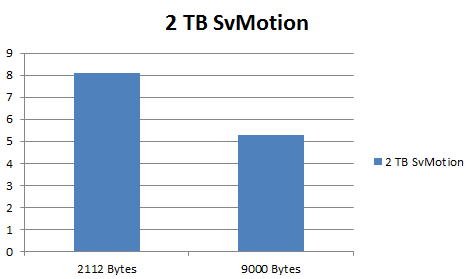
It’s just a quick and dirty test on a barely-active VMDK, but you can see that with 9000 Byte FC frames, it’s almost twice as fast.
February 16, 2013 Leave a comment
My colleague Barry Gursky was playing with the new UCS Manager Emulator for the new 2.1 release (which you can find on Cisco’s web site, you’ll need a CCO account but no special contracts from what I can tell) and he noticed something. The Management IP Pool menu was missing.

UCS Manager 2.0 and prior had the Management IP Pool in the Admin Tab
It’s normally in the Admin tab, as shown above. But sure enough, it was gone.
You need pools of IP addresses to assign to service profiles and blades for out of band management (Cisco Integrated Management Controller, gives you KVM, IPMI, etc.). Or you could assign the IPs manually, but that would be rather annoying. Pools are way easier.
We searched and finally found it moved to the LAN tab.

Mystery solved.

February 2, 2013 5 Comments
Congestion happens. You try to put a 10 pound (soy-based vegan) ham in a 5 pound bag, it just ain’t gonna work. And in the topsy-turvey world of data center switches, what do we do to mitigate congestion? Most of the time, the answer can be found in the wisdom of Snoop Dogg/Lion.

Of course, when things are fine, the world of Ethernet is live and let live.

We’re fine. We’re all fine here now, thank you. How are you?
But when push comes to shove, frames get dropped. Either the buffer fills up and tail drop occurs, or QoS is configured and something like WRED (Weight Random Early Detection) kicks in to proactively drop frames before taildrop can occur (mostly to keep TCP’s behavior from causing spiky behavior).

The Bit Grim Reaper is way better than leaky buckets
Most congestion remediation methods involve one or more types of dropping frames. The various protocols running on top of Ethernet such as IP, TCP/UDP, as well as higher level protocols, were written with this lossfull nature in mind. Protocols like TCP have retransmission and flow control, and higher level protocols that employ UDP (such as voice) have other ways of dealing with the plumbing gets stopped-up. But dropping it like it’s hot isn’t the only way to handle congestion in Ethernet:

Please Hammer, Don’t PAUSE ‘Em
Ethernet has the ability to employ flow control on physical interfaces, so that when congestion is about to occur, the receiving port can signal to the sending port to stop sending for a period of time. This is referred to simply as 802.3x Ethernet flow control, or as I like to call it, old-timey flow control, as it’s been in Ethernet since about 1997. When a receive buffer is close to being full, the receiving side will send a PAUSE frame to the sending side.

Too legit to drop
A wide variety of Ethernet devices support old-timey flow control, everything from data center switches to the USB dongle for my MacBook Air.

One of the drawbacks of old-timey flow control is that it pauses all traffic, regardless of any QoS considerations. This creates a condition referred to as HoL (Head of Line) blocking, and can cause higher priority (and latency sensitive) traffic to get delayed on account of lower priority traffic. To address this, a new type of flow control was created called 802.1Qbb PFC (Priority Flow Control).
PFC allows a receiving port send PAUSE frames that only affect specific CoS lanes (0 through 7). Part of the 802.1Q standard is a 3-bit field that represents the Class of Service, giving us a total of 8 classes of service, though two are traditionally reserved for control plane traffic so we have six to play with (which, by the way, is a lot simpler than the 6-bit DSCP field in IP). Utilizing PFC, some CoS values can be made lossless, while others are lossfull.
Why would you want to pause traffic instead of drop traffic when congestion occurs?
Much of the IP traffic that traverses our data centers is OK with a bit of loss. It’s expected. Any protocol will have its performance degraded if packet loss is severe, but most traffic can take a bit of loss. And it’s not like pausing traffic will magically make congestion go away.
But there is some traffic that can benefit from losslessness, and and that just flat out requires it. FCoE (Fibre Channel of Ethernet), a favorite topic of mine, requires losslessness to operate. Fibre Channel is inherently a lossless protocol (by use of B2B or Buffer to Buffer credits), since the primary payload for a FC frame is SCSI. SCSI does not handle loss very well, so FC was engineered to be lossless. As such, priority flow control is one of the (several) requirements for a switch to be able to forward FCoE frames.
iSCSI is also a protocol that can benefit from pause congestion handling rather than dropping. Instead of encapsulating SCSI into FC frames, iSCSI encapsulates SCSI into TCP segments. This means that if a TCP segment is lost, it will be retransmitted. So at first glance it would seem that iSCSI can handle loss fine.
From a performance perspective, TCP suffers mightily when a segment is lost because of TCP congestion management techniques. When a segment is lost, TCP backs off on its transmission rate (specifically the number of segments in flight without acknowledgement), and then ramps back up again. By making the iSCSI traffic lossless, packets will be slowed down during congestions but the TCP congestion algorithm wouldn’t be used. As a result, many iSCSI vendors recommend turning on old-timey flow control to keep packet loss to a minimum.
However, many switches today can’t actually do full losslessness. Take the venerable Catalyst 6500. It’s a switch that would be very common in data centers, and it is a frame murdering machine.
The problem is that while the Catalyst 6500 supports old-timey flow control (it doesn’t support PFC) on physical ports, there’s no mechanism that I’m aware of to prevent buffer overruns from one port to another inside the switch. Take the example of two ingress Gigabit Ethernet ports sending traffic to a single egress Gigabit Ethernet port. Both ingress ports are running at line rate. There’s no signaling (at least that I’m aware of, could be wrong) that would prevent the egress ports from overwhelming the transmit buffer of the ingress port.

Many frames enter, not all leave
This is like flying to Hawaii and not reserving a hotel room before you get on the plane. You could land and have no place to stay. Because there’s no way to ensure losslessness on a Catalyst 6500 (or many other types of switches from various vendors), the Catalyst 6500 is like Thunderdome. Many frames enter, not all leave.

Catalyst 6500 shown with a Sup2T
The new generation of DCB (Data Center Bridging) switches, however, use a concept known as VoQ (Virtual Output Queues). With VoQs, the ingress port will not send a frame to the egress port unless there’s room. If there isn’t room, the frame will stay in the ingress buffer until there’s room.If the ingress buffer is full, it can have signaled the sending port it’s connected to to PAUSE (either old-timey pause or PFC).
This is a technique that’s been in used in Fibre Channel switches from both Brocade and Cisco (as well as others) for a while now, and is now making its way into DCB Ethernet switches from various vendors. Cisco’s Nexus line, for example, make use of VoQs, and so do Brocade’s VCS switches. Some type of lossless ability between internal ports is required in order to be a DCB switch, since FCoE requires losslessness.
DCB switches require lossless backplanes/internal fabrics, support for PFC, ETS (Enhanced Transmission Selection, a way to reserve bandwidth on various CoS lanes), and DCBx (a way to communicate these capabilities to adjacent switches). This makes them capable of a lot of cool stuff that non-DCB switches can’t do, such as losslessness.
One thing to keep in mind, however, is when Layer 3 comes into play. My guess is that even in a DCB switch that can do Layer 3, losslessness can’t be extended beyond a Layer 2 boundary. That’s not an issue with FCoE, since it’s only Layer 2, but iSCSI can be routed.


 The Data Center Overlords