TLS 1.2: The New Hotness for Load Balancers

Aright implementors of services that utilize TLS/SSL, shit just got real. TLS 1.0/SSL 3.0? Old and busted. TLS 1.2? New hotness.

We config together, we die together. Bad admins for life.

There’s an exploit for SSL and TLS, and it’s called BEAST. It takes advantage of a previously known (but though to be too impractical to exploit) weakness in CBC. Only BEAST was able to exploit that weakness in a previously unconsidered way, making it much more than a theoretical problem. (If you’re keeping track, that’s preciously the moment that shit got real).

The cure is an update to the TLS/SSL standard called TLS 1.2, and it’s been around since 2008 (TLS 1.1 also fixes it, and has been available since 2006, but we’re talking about new hotness here).

So no problem, right? Just TLS 1.2 all the things.

Well, virtually no one uses it. It’s a chicken and egg problem. Clients haven’t supported it, so servers haven’t. Servers didn’t support it, so why would clients put the effort in? Plus, there wasn’t any reason to. The CBC weakness had been known, but it was thought to be too impractical to exploit.

But now we’re in a state of shit-is-real, so it’s time to TLS up.

So every browser and server platform running SSL is going to need to be updated to support TLS 1.2. On the client side, Google Chrome, Apple Safari, Firefox, IE (although IE 9 supports TLS 1.1, but previous version will need to be back ported) will need to be updated.

On the server side, it might be a bit simpler than we think. Most of the time when we connect to a website that utilizes SSL (HTTPS), the client isn’t actually talking SSL to the server, instead they’re talking to a load balancer that terminates the SSL connection.

Since most of the world’s websites have a load balancer terminate the SSL, we can update the load balancers with TLS 1.2 and take care of a major portion of the servers on the Internet.

Right now, most of the load balancing vendors don’t support TLS 1.2. If asked, they’ll likely say that there’s been no demand for it since clients don’t support it, which was fine until now. Now is the time for the various vendors to upgrade to 1.2, and if you’re a vendor and you’re not sure if it’s worth the effort, listen to Yoda:

Right now the only vendor I know of that supports TLS 1.2 is the market leader F5 Networks with their version 11 of their LTM, for which they should be commended. However, that’s not good enough, they need to backport version 10 (which has a huge install base). Vendors like Cisco, A10 Networks, Radware, KEMP Technologies, etc., need to also update their software to TLS 1.2. We can no longer use the excuse “because browsers don’t support it”. Because of BEAST, they will soon, and so do they.

In the meantime, if you’re running a load balancer that terminates SSL, you may want to change your cipher settings to prefer RC4-SHA instead of AES (which uses CBC). It’s cryptographically weaker, but is immune to the CBC issue. In the next few days, I’ll be putting together a page on how to prefer RC4 for the various vendors.

Rembmer, TLS 1.0/SSL 3.0: Old and busted. TLS 1.2? New hotness.

SSL’s No Good, Very Bad Couple of Months

The world of SSL/TLS security has had, well, a bad couple of months.

‘Tis but a limited exploit!

First, we’ve had a rash of very serious certificate authority security breaches. An Iranian hacker was able to hack Comodo, a certificate authority, and create valid, signed certficates for sites like microsoft.com and gmail.com. Then another SSL certificate authority in the Netherlands got p0wned so bad the government stepped in and took them over, probably from the same group of hackers from Iran.

Iran and China have both been accused of spying on dissidents through government or paragovernment forces. The Comodo and DigiNotar hacks may have lead to spying of Iranian dissidents, an a suspected attack by China a while ago prompted Google to SSL all Gmail connections at all times (not just username/password) by default, for everyone.

Between OCSP and CRLs, browser updates and rogue certificates, it’s called into question the very fabric of trust that we’ve taken for granted. Some even claim that PKI is totally broken (and there’s a reasonable argument for this).

This is what happens when there’s no trust. Also, this is how someone loses an eye. Do you want to lose an eye? Because this will totally do it.

Then someone found a way to straight up decrypt an SSL connection without any of the keys.

Wait, what?

It’s getting’ all “hack the planet” up in here.

The exploit is called BEAST, and it’s one that can decrypt SSL communications without having the secret. Thai Duong, one of the authors (the other is Juliano Rizzo) of the tool saw my post on BEAST, and invited me to watch the live demonstration from the hacker conference. Sure enough, they could decrypt SSL. Here’s video from the presentation:

Let me say that again. They could straight up decrypt that shit. 

Granted, there were some caveats, and the exploit can only be used in a in a somewhat limited fashion. It was a man-in-the-middle attack, but one that didn’t terminate the SSL connection anywhere but at the server. They found a new way to attack a known (but thought to be too impractical to exploit) vulnerability in the CBC part of some encryption algorithms.

The security community has known this was a potential problem for years, and it’s been fixed in TLS 1.1 and 1.2.

Wait, TLS? I thought this was about SSL?

Quick sidebar on SSL/TLS. SSL is the old term (the one everyone still uses, however). TLS replaced SSL, and we’re currently on TLS 1.2, although most people use TLS 1.0.

And that’s the problem. Everyone, and I do mean the entire planet, uses SSL 3.0 and TLS 1.0.  TLS 1.1 has been around since 2006, and TLS 1.2 has been around since 2008. But most web servers and browsers, as well as all manner of other types of SSL-enabled devices, don’t use anything beyond TLS 1.0.

And, here’s something that’s going to shock you:

Microsoft IIS and Windows 7 support TLS 1.1. OpenSSL, the project responsible for the vast majority of SSL infrastructure used by open source products (and much of the infrastructure for closed-source projects), doesn’t. As of writing, TLS 1.1 or above hasn’t made it yet into OpenSSL libraries, which means Apache, OpenSSH, and other tools that make use of the OpenSSL libraries can’t use anything above TLS 1.0. Look at how much of a pain in the ass it is right now to enable TLS 1.2 in Apache.

We’re into double-facepalm territory now

No good, very bad month indeed.

So now we’re going to have to update all of the web servers out there, as well as all the clients. That’s going to take a bit of doing. OpenSSL runs the SSL portion of a lot of sites, and they’ve yet to bake TLS 1.1/1.2 into the versions that everyone uses (0.9.8 and 1.0.x). Load balancers are going to play a central role in all of this. so we’ll have to wait for F5, Cisco, A10 Networks, Radware, and others to support TLS 1.2. As far as I can tell, only F5’s LTM version 11 supports anything above TLS 1.0.

The tougher part will be all of the browsers out there. There are a lot of systems that run non-supported and abandoned browsers. At least SSL/TLS is smart enough to be able to downgrade to the highest common denominator, but that would mean potentially vulnerable clients.

In the meantime something that web servers and load balancers can do is take Google’s lead and prefer the RC4 symmetric algorithm. While cryptographically weaker, it’s immune to the CBC attack.

This highlights the importance of keeping your software, both clients and servers, up to date.  Out of convenience we got stale with SSL, and even security the security obsessed OpenSSL project got caught with their pants down. This is really going to shake a lot of systems down, and hopefully be a kick in the pants to those that think it’s OK to not run current software.

I worked at an organization once where the developers forked off Apache (1.3.9 I believe) to interact with an application they developed. This meant that we couldn’t update to the latest version of Apache, as they refused to put the work in to port their application module to the updated versions of Apache. I bet you can guess how this ended. Give up? The Apache servers got p0wned.

So between BEAST and PKI problems, SSL/TLS has had a rough go at it lately. It’s not time to resort to smoke signals just yet, but it’s going to take some time before we get back to the level of confidence we once had. It’s a scary-ass world out there. Stay secure, my friends.

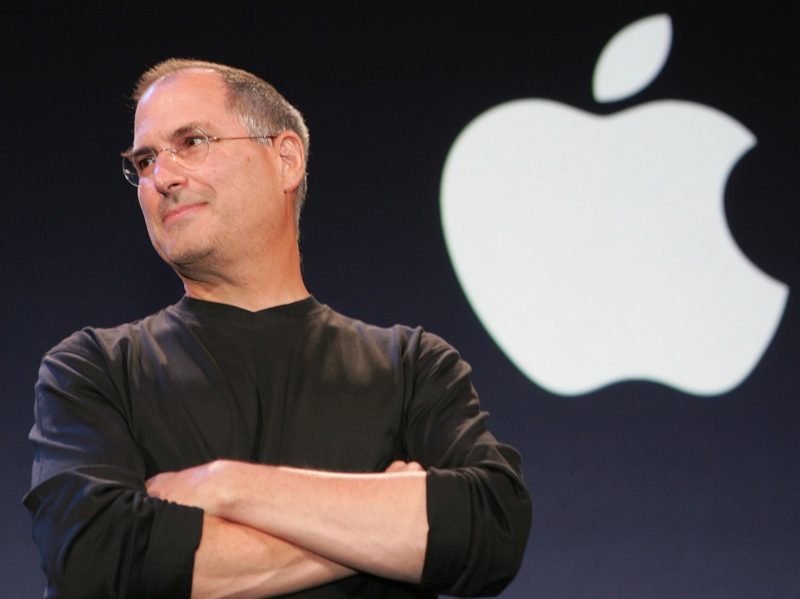
Steve Jobs

Like so many of us, my first computer was an Apple. An Apple //c, to be exact. It was then that I first learned about Steve Jobs.

In 1996, I was working as a dial-up tech support technician and junior Solaris administrator for a fledging dedicated server company called digitalNATION. Everyone there, from the CEO to the receptionist, had a NeXT workstation. NeXT was one of the companies that Steve Jobs founded after being ousted from Apple (the other being a company he bought from George Lucas, which became Pixar).

If you’ve never worked with a NeXT, it’s what computers would be like in 10 years. In 1996 I could drag and drop a file from a folder into an email, and it would auto-attach itself. Today, that’s old hat. But in 1996, NeXT was about the only operating system that could pull off that “drag and drop” seamlessness. Even though NeXTSTEP was based on BSD/Unix, you didn’t have to see the Unix parts if you didn’t want to.

The CEO of digitalNATION, Bruce Waldack (who passed away in 2007) was one of the earlier resellers of NeXT gear, and knew Jobs. Bruce told me that Jobs was vegan, which I initially didn’t believe (I’m vegan, and I thought he was taunting my fanboyism).

Bruce said “Don’t believe me? Email him. sjobs@next.com”. So I did. I composed quick email message: “Dear Steve. Are you vegan?”

Within the hour, I got a curt reply: “Yes -Steve”.

I’m sure I squealed like a school girl.

As the years progressed, I read every biography on Jobs and Apple I could get my hands on. He was a fascinating man. A geek gone good. Complicated, flawed, yet undeniably effective.

I think it’s somewhat telling that Steve Jobs, quite possibly the best CEO the business world has seen in 100 years, didn’t get an MBA or law degree, but instead spent his young adulthood as a stinky (literally) fruitarian who dropped acid and went to India. Seriously, Steve thought that because he was a fruititarian he didn’t need to bathe. The stories of his overpowering stench in the early days of Apple are legendary. While most Forutne 50 CEOs are insufferable douchebags with halitosis competing with other bad-breath in matters of golf and yaucts. Steve walked around in jeans and sneakers. His decisions were made for the long term, while other leaders fretted about the quarter. Under Jobs, Apple wasn’t afraid to eat its young (iPhone eating iPod sales, iPad eating MacBook sales). Few companies had the guts.

But it was more than his business successes or influence on technology that inspired me personally. It was the way he lived his life, it was his philosophy and his fearlessness. Many of you have heard of or seen his commencement speech at Standford in 2005. If you haven’t read it, it’s one of the most inspiring pieces of work I’ve ever read (and that’s no hyperbole). I’ve read it at least once a year since 2005, and I’ve never read it with a dry eye.

I’ll give you an example: Since I was a kid, I’ve dreamed of piloting a plane. In 2008, I moved from New York City to Portland, Oregon, and pursued that dream by training to get my pilots license.

But there was a problem: Even though I’d flown hundreds of thousands of miles on commercial airlines in the preceding three years, it turned out being at the controls of a small plane myself scared the absolute daylights out of me. During my first flight with my instructor, in a 2-seater Cessna 150 built the year before I was born, I held on to the control yoke for dear life so tightly, I worried the rental company was going to charge me extra for buffing out my fingerprints.

I would drive to my flying lessons, shaking with fear. I would almost turn around and head back home, with some excuse as to why I couldn’t make it. But I didn’t.

The antedate for that fear came from the words of Steve Jobs.

Remembering that I’ll be dead soon is the most important tool I’ve ever encountered to help me make the big choices in life. Because almost everything — all external expectations, all pride, all fear of embarrassment or failure – these things just fall away in the face of death, leaving only what is truly important. Remembering that you are going to die is the best way I know to avoid the trap of thinking you have something to lose. You are already naked. There is no reason not to follow your heart.

Someday, I am going to die. I didn’t want to die before I could fly a plane. Dive with sharks. Run a marathon on every continent in the world. Talk to that girl. Help a stranger on the street. What might stop me? Fear of death, fear of loss, fear of failure, fear of embarrassment, fear of looking stupid.

We all fight fear in our daily lives. From the big decisions to the little ones, there’s always doubt and fear in the back of our mind. It’s amazing how fear of little things (rejection, embarrassment) end up causing us as much fear as the big things (death, loss). Big fear of small fear, they all hold us back.

Partly with Steve’s words in mind, I’ve been able to do this:

So it’s not the iPod, iPad, or MacBook Air that I’m writing this on that I will remember Steve Jobs by. It will be the memories of flying an airplane upside down, running a Marathon on the Great Wall of China, swimming with sharks, and facing the thousand little fears we all have every day.

Stay Fearless, stay foolish. Steve Jobs: Fuck yeah.

Dare To Be Stupid

I was fortunate to be a guest again on the Packet Pusher’s Podcast recently, and one of the topics was an audience question regarding how to keep up with all that’s going on in the networking world. The group as a whole came up with some great insights, but I thought this would also make a great blog post.

Depending on your point of view, it can either be an exciting time or a terrifying time to be in data center networking. Here’s a small list of all the new stuff that you’re likely going to have to be familiar with: LISP, OTV, SPB, Fabric Path, TRILL, FCoE, FCoTR, BSP, IPv6, IS-IS, VXLAN, NVGRE, NPV, NPIV, EVB, as well as technologies that have been around for a little while but are much more prominent in a networker’s life such as iSCSI and Fibre Channel. And that’s just the data center. With campus and enterprise networking, you’ve got VOIP, unified communications, MPLS, VPLS, metro Ethernet, and more.

*BSP: The Bullshit Protocol. Used to see if you’re paying attention.

So how do you keep up with all this? I’ll admit, it can be a bit overwhelming. But the answer comes from the timeless wisdom of Weird Al Yankovic: Dare to be stupid.

One of the greatest mistakes I see people making in IT is that they stop learning. This is a common folly, and it never ends well. I know this because this is a mistake I’ve made big time. Let’s take the wayback machine to the late ’90s, early 2000’s.

This was a period in my career where I thought I was hot shit. In the late 90s and early 2000s, I was an expert in load balancing, and everyone who wanted to know information about load balancing came to me. I was Mr. Load Balancer.


We all have an inner one of these

But there were huge, huge gaps in my knowledge. Gaps in networking, gaps in system administration, and gaps in my HTTP knowledge. During the heyday of the First Great Internet Bubble, technical talent was a scarce and precious resource, and anyone with experience and skills did very, very well. It made for a great living, but the downside was that it made it very easy to ignore skills gaps, and ignore those gaps I did. I thought that because I was hot shit, that I didn’t need to spend too much time learning. I didn’t dare be stupid.

But it caught up with me. I did a telephone interview with a load balancing vendor, and I got ripped to shreds. They found the gaping holes in my knowledge easily, and it was quite a humbling experience. Initially I was angry, and I thought they were being overly pedantic (something I still dislike). But it wasn’t the IP header overhead of an unlaiden swallow that I didn’t know, it was core concepts that I didn’t know.

It took a while, but my ego healed enough to realize I had a problem: I had to get my shit together. They were right to rip me to shreds (they were nice about it, but having large areas of ignorance in an area you thought you knew well is fairly unpleasant).

Moral of the story? Don’t rest on your laurels, and dare to be stupid. Otherwise, it will be your undoing. And if you’ve been too chicken to be stupid, it’s not too late. I eventually got my shit together. When I started my tract to become a Cisco Certified Systems Instructor (CCSI), I confronted those huge gaps head on, and it was humbling. On my first attempt at the CCNA, I failed so badly that I thought Johns Chambers was going to get a phone call. I thought I was good at networking, but I couldn’t even do proper subnetting. (Like most sysadmins, if it wasn’t a class C subnet, 255.255.255.0, I was completely lost.)

What the fuck does 255.255.255.224 mean?

Eventually I learned subnetting, networking, and filled in the gaps. And I know what 255.255.255.224 means. So always be learning. And a trick I’ve used to continually learn is to learn something not related to computers. You’d be amazed at the insights you can get from learning a completely unrelated skill. For instance, in the past 5 years I’ve learned how to scuba dive, fly a plane, and ball room dance. Each one of those gave me incredible insights into how I learn. Keep at it.

The Magic Words

The three magic words in IT are also among the most painful to say: “I don’t know”. That’s especially true for me, an IT instructor. I’m supposed to know the answer, but I don’t always do. So saying “I don’t know” is quite painful.

In IT, knowledge is our currency, and ignorance is poverty. So it’s really tough to admit ignorance. But it’s important to fight that urge, and say the words “I don’t’ know”.

Even with that motto, part of me still cringes when those words escape my lips. I have a confession to make: During the most recent podcast I was on, Ethan asked me if I knew about vPC with the Nexus 2000 FEX. My response was “It’s been so long since I taught Nexus 7000”. That was basically me being too much of a chicken shit to say “I have no frakkin’ clue.”

Don’t Be An Asshole

Have you ever worked with someone who made you feel small? Where they seem to take delight in showing you how you fucked up? Do they take delight in highlighting your ignorance? Someone who enjoys a good gotcha?

Fuck those people.

Also, stay away from them. Avoid them like the plague. They create environments that are not conducive to learning. Learning is filling in the gaps of knowledge, and it’s tougher to do that when you don’t feel safe to admit you don’t know the answer.

I used to work with a guy like that back in 1998. I was a green Unix administrator whippersnapper, and there was a senior admin who used his powers for evil. He would lord his knowledge over us lesser experienced people. It was a hostile environment for growing. It backfires on them, however, since they stop growing too. They’ll be stuck at their skill level, because they’ll avoid areas where they aren’t the smartest person in the room. They don’t dare to be stupid.

And for Kirk’s sake, don’t be one of those people. Don’t be an asshole, be a teacher. If someone has a lesser level of knowledge on a subject, don’t berate them, don’t lord it over them, help them understand. Want to know how well you know a subject? Explain it to someone who ins’t familiar. You’ll figure out a topic much more comprehensively to that. That’s one of the secrets of blogging, you learn more about a subject simply by writing about it and organizing your thoughts on it (and coming up with clever pictures and captions).

Pull A Superman 2

I’m fortunate enough to have been invited to be a delegate for Network Field Day 2. If you’re not familiar with Network Field Day, it’s a networking-oriented offshoot of Tech Field Day, the brain child of Stephen Foskett, storage expert extrordinarre (check out his great talk on iSCSI and FCoE). If you want to keep up with the future of IT developments, whether it’s storage, networking, or virtualization, pay attention to Tech Field Day and its offshoots. The companies that present (for the most part) aren’t pitching old ideas, they’re pitching what’s next. (For instance, Fsck It! We’ll Do It All in SSDs!)

When I take a look at the other delegates for the upcoming Network Field Day 2, I can only come to one conclusion: I’m not worthy.

Ivan Pepelnjak, Greg Ferro, Ethan Banks, Tom Hollingsworth, Brandon Carrol, (along with my fellow former condescending Unix administrator Mrs Y.) these some of the smartest, most experienced people in networking. And they love to share. I’m not at their level, and I’m likely going to embarrass myself. But I’m going anyway, because it’s a great opportunity to soak up as much knowledge from them as I can. I’m even preparing my own Superman 2 chamber, where I can steal their powers and abilities. And I’m doing it by daring to be stupid.

Surround yourself with people who know more than you, and like sharing that knowledge. You’ll naturally soak up their power.

So if you want to increase your kung fu, learn all the things, and bring out your inner “fuck yea”, then dare to be stupid.

Fsck It, We’ll Do It All With SSDs!

At Tech Field Day 8, we saw presentations from two vendors that had an all-flash SAN offering, taking on a storage problem that’s been brewing in data centers for a while now, and the skewed performance/capacity scale.

While storage capacity has been increasing exponentially, storage performance hasn’t caught up nearly that fast. In fact, performance has been mostly stagnant, especially in the area where it counts: Latency and IOPS (I/O Operations Per Second).

It’s all about the IOPS, baby

In modern data centers, capacity isn’t so much of an issue with storage. Neither is the traditional throughput metric, such as megabytes per second. What really counts is IOPS and latency/seek time. Don’t get me wrong, some data center applications certainly have capacity requirements, as well as potential throughput requirements, but for the most part these are easily met by today’s technology.

IOPS and latency are super critical for virtual desktops (and desktops in general) and databases. If you computer is sluggish, it’s probably not a lack of RAM or CPU, by and large it’s a factor of IOPS (or lack thereof).

There are a few tricks that storage administrators and vendors have up their sleeve to increase IOPS and drop latency.

In a RAID array, you can scale IOPS linerally by just throwing more disks at the array. If you have a drive that does 100 IOPS per second, add a second drive for a RAID 0 (mirror) and you’ve got double the IOPS. Add a third and you’ve got 300 IOPS (and of course add more for redundancy).

Another trick that storage administrators have up their sleeve is the technique known as “short stroking“, where only a portion of the drive is used. In a spinning platter, the outside is spinning the fastest, giving the best performance. If you only format that out portion, the physical drive head doesn’t have to travel as far. This can reduce seek time substantially.

Tiered storage can help with both latency and IOPS, were a combination of NVRAM, SSDs, and hard drives are combined.”Hot” data is accessed from high-speed RAM cache, “warm” data is on a bank of SSDs, and “cold” data would be stored on cheaper SAS or (increasingly) consumer SATA drives.

And still our demand for IOPS is insatiable, and the tricks in some cases aren’t catching up. Short stroking only goes so far, and cache misses can really impact performance for tiered storage. While IOPS scale linearly, the IOPS we need can sometimes end up with racks full of spinning rust, while only using a tenth of the actual capacity. That’s a lot of wasted space and wasted power.

And want to hear a depressing fact?

A high-end enterprise SAS 15,000 RPM drive (which spins faster than most jet engines) gives you about 150 IOPS in performance (depending on the workload of course). A good consumer grade SSD from Newegg gives you around 85,000 IOPS. That means you would need almost 600 drives to equal the performance of one consumer grade SSD.

That’s enough to cause anyone to have a Bill O’Reilly moment.

600 drives? Fuck it, we’ll do it with all flash!

No one is going to put their entire database or virtual desktop infrastructure on a single flash drive of course. And that’s where vendors like Pure Storage and SolidFire come into play. (You can see Pure Storage’s presentation at Tech Field Day 8 here. SolidFire’s can be seen here.)

The overall premise with the we’ll-do-it-all-in-flash play is that you can take a lot of consumer grade flash drives, use the shitload of IOPS that they bring, and combine it with a lot of storage controller CPU power for deduplication and compression. With that combination, they can offer an all-flash based array at the same price per gig as traditional arrays comprise of spinning rust (disk drives).

How many IOPS are we talking about? SolidFire’s SF3010 claims 50,000 IOPS per 1 RU node. That would replace over 300 drives of traditional drives, which I don’t think you can put in 1RU. Pure Storage claims 300,000 IOPS in 8U of space. With a traditional array, you’d need over 2000 drives, also unlikely to fit in 8 RU. Also, imagine the power savings, with only 250 watts needed for SoldFire’s node, and 1300 Watts for the PureStorage cluster.  And Both allow you to scale up by adding more nodes.

You wire them into your SAN the traditional ways, as well. The Pure Storage solution has options for 10 Gbit iSCSI and 8 Gbit Fibre Channel, while the SolidFire solution is iSCSI only. (Sadly, neither support FCoE or FCoTR.)

For organizations that are doing virtual desktops or databases, an all-flash storage array with the power savings and monster IOPS must look more tantalizing than a starship full of green-skinned girls does to Captain Kirk.

There is a bit of a controversy in that many of the all-flash vendors will tell you capacity numbers with deduplication and compression taken into account. At the same time, if the performance is better than spinning rust even with the compression/dedupe, then who cares?

So SSD it is. And as anyone who has an SSD in their laptop or desktop will tell you, that shit is choice. Seriously, I get all Charlton Heston about my SSD.

You’ll pry this SSD from my cold, dead hands

It’s not all roses and unicorn-powered SSDs. There are two issues with the all-flash solution thus far. One is that they don’t have a name like NetApp, EMC, or Fujitsu, so there is a bit of a trust issue there. The other issue is that many have some negative preconceptions about flash, such as they have a high failure rate (due to a series of bad firmwares from vendors) and the limited write cycle of memory cells (true, but mitigaitable). Pure Storage claims to have never had a drive fail on them (Amy called them flash driver whispers).

Still though, check them (and any other all-SSD vendor) out. This is clearly the future in terms of high performance storage where IOPS is needed. Spinning rust will probably rule the capacity play for a while, but you have to imagine its days are numbered.

Automation Conundrum

During Tech Field Day 8, we saw lots of great presentations from amazing companies. One presentation that disappointed, however, was Symantec. It was dull (lots of marketing) and a lot of the stuff they had to offer (like dedupe and compression in their storage file system) had been around in competing products for many years. If you use the products, that’s probably pretty exciting, but it’s not exactly making me want to jump in. And I think Robin Harris had the best description of their marketing position when he called it “Cloudwashing”. I’ve taken the liberty of creating a dictionary-style definition for Cloudwashing:

Cloudwashing: Verb. 1. The act of taking your shitty products and contriving some relevance to the blah blah cloud. 

One product that I particularly wasn’t impressed by was Symantec’s Veritas Operations Manager. It’s a suite that’s supposed to automate and report on a disparate set of operating systems and platforms, providing a single pane of glass for virtualized data center operations. “With just a few clicks on Veritas Operations Manager, you can start and stop multi-tier applications decreasing downtime.” That’s the marketing, anyway.

In reality, what they seemed to have create was an elaborate system to… automatically restart a service if it failed. You’d install this pane of glass, pay the licensing fee or whatever, configure the hooks into all your application server, web servers, database servers… and what does it do? It restarts the process if it fails. What does it do beyond that? Not much more, from what I could see in the demo. I pressed them on a few issues during the presentation (which you can see here, the Virtual Business Services part starts around the 32 minutes mark), and that’s all they seemed to have. Restarting a process.

So, not terribly useful. But I don’t think The problem is one of engineering, instead I think it’s the overall philosophy of top-down automation.

See, we all have visions of Iron Man in our heads.

Iron Man Says: Cloud That Shit

Wait, what? Iron Man?

Yes, Iron Man. In the first Iron Man movie, billionaire industrialist Tony Stark built three suits: One to get him out of the cave, the second, all silver, had an icing problem, and the third which was used in the rest of the movie to punch the shit out of a lot of bad guys. He built the first two by hand. The third however, was built through complete automation. He said “build it” and the Jarvis, his computer said: “Commencing automated assembly. Estimated completion time is five hours.”

And then he takes his super car to go to a glamorous party.

Fuck you, Tony Stark. I bet you never had to restart a service manually.

How many times have you said “Jarvis, spin up 1,000 new desktop VMs, replicate our existing environment to the standby datacenter, and resolve the last three trouble tickets” and then went off in an Audi R8 to a glamorous party? I’m guessing none.

So, are we stuck doing everything manually, by hand, like chumps? No, but I don’t believe the solution will be top-down. It will be bottom-up.

The real benefit of automation that we’re seeing today is from automating the simple tasks, not by orchestrating some amazing AI with a self-healing, self-replicating SkyNet-type singularity. It’s from automating the little mundane tasks here and there. The time savings are enormous, and while it isn’t as glamorous as having a self-healing sky-net style data center, it does give us a lot more time to do actual glamorous things.

Since I teach Cisco’s UCS blade systems, I’ll use them as an example (sorry, HP). In UCS, there is the concept of service profiles, which are an abstraction of aspects of a server that are usually tied to a physical server, and found in disparate places. Boot order (BIOS), connectivity (SAN and LAN switches), BIOS and HBA firmware (typically flashed separately and manually), MAC and WWN addresses (burnt in), and more are all stored and configured via a single service profile, and that profile is then assigned to a blade. Cisco even made a demonstration video showing they could get a new chassis with a single blade up and online with ESXi in less than 30 minutes from sitting-in-the-box to install.

The Cisco UCS system isn’t particularly intelligent, doesn’t respond dynamically to increased load, but it automates a lot of tasks that we used to have to do manually. It “lubes” the process, as Chris Sacca used the term lube in a great talk he did at Le Web 2009. I’ll take that over some overly complicated pane-of-glass solution that essentially restarts processes when they stop any day.

Perhaps at some point we’ll get to the uber-smart self-healing data center, but right now everyone who has tried has come up really, really short. Instead, there have been tremendous benefits in automating the mundane tasks, the unsexy tasks.

SSL: Who Do You Trust?

Note: This is a post that appeared on the site lbdigest.com about a year or so ago, but given that SSL is back in the news lately, I figured it’s worth updating and re-posting. Also, it features the greatest SSL diagram ever created. Seriously, if you fire up Visio/Omnigraffle, know the best you can hope for is second place. 

One of the most important technologies used on Internet is the TLS/SSL protocol (typically called just SSL, but that’s a whole different article).  The two benefits that TLS/SSL gives us are privacy and trust.

Privacy comes through the use of digital encryption (RSA, AES, etc.) to keep your various Internet interactions, such as credit card numbers, emails, passwords, saucy instant messages, confidential documents, etc., safe from prying eyes. That part is pretty well understood by most in the IT industry.

But having private communications with another party is all for naught if you’re talking to the wrong party.  You also need trust.  Trust that someone is who they say they are. For Internet commerce to work on a practical level, you need to able to trust that when you’re typing your username and password into your bank’s website, that you’re actually connecting to a bank, and not someone pretending to be your bank.

Trust is accomplished through the use of SSL certificates, CAs (certificate authorities), intermediate certificates, and certificate chains which combined is known as PKI (Public Key Infrastructure).   To elaborate on the use of these technologies to provide trust, I’m going to forgo the traditional Bob and Alice encryption examples, and go for something a little closer to your heart.  I’m going to drop some Star Trek on you.

Let’s say you’re in the market for a starship.  You’re looking for a sporty model with warp drive, heated seats, and most importantly, a holodeck. You go to your local Starfleet dealer, and you find this guy.

Ensign Tony.

 Seriously Tony, have you even talked to a girl?

The problem is, you don’t trust this guy. It’s nothing personal, but you just don’t know him. He says he’s Ensign Tony, but you have no idea if it’s really him or not.  But there is one Starfleet officer you do know and trust implicitly, even though you never met him.  You trust Captain Jean-Luc Picard.

Picard’s Law: Set up a peace conference first, ask questions later

Captain Picard is the kind of guy you start out automatically trusting. His reputation precedes him. Your browser is the same way, in that right out of the gate there are several sources (such as Verisign) that your browser trusts implicitly.

If you want to check out who your browser trusts, you can typically find it somewhere in the preferences section. For example, in Google Chrome, go into Preferences, and then Under the Hood. On a Mac this opens up the system-wide keystore for all the trusted certificates and keys. In other operating systems and/or browsers, you may have different certificate stores for different browsers, or like with a Mac all the programs may share a single centralized certificate store.

Back to the Star Trek analogy.

But you’re not dealing with Picard directly.  Instead, you’re dealing with Ensign Tony.  So Picard vouches for Ensign Tony, and thus a trust chain is built.   You trust Picard, and Picard trusts Ensign Tony, so by the transitive property, you can now trust Ensign Tony.

That is the essence of trust in SSL.

Intermediate Certificates

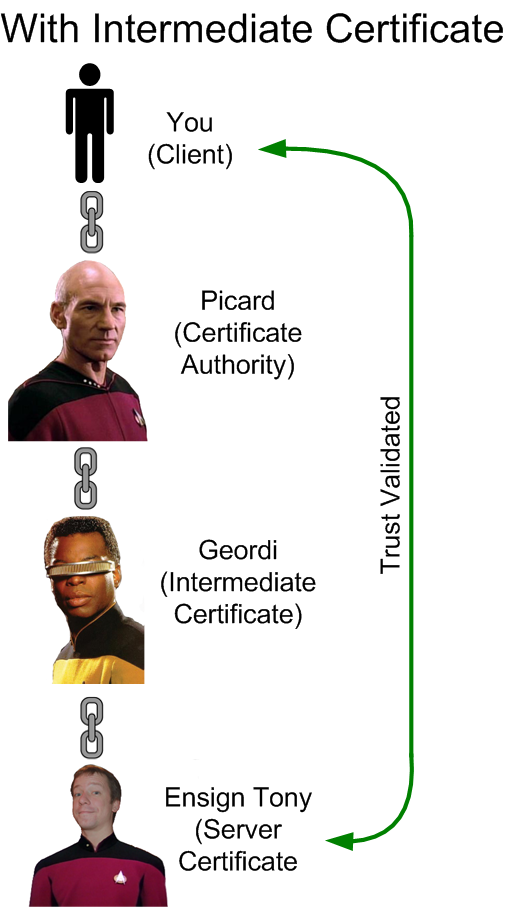
One of the lesser understood concepts in the us of SSL certificates is the intermediate certificates.  These are certificates that sit between the CA (Picard) and the site certificate (Ensign Tony).

You see, Picard is an important man.  The Enterprise has over a thousand crew members and he can’t possibly personally know and trust all of them.  (In Ensign Tony’s case, there’s also the little matter of a restraining order.)  So he farms the trust out to his subordinates. And one crew member he does implicitly trust is Chief Engineer Geordi La Forge.

Ensign Tony works for Geordi, and Geordi trusts Ensign Tony.  Thus Geordi becomes the intermediate certificate in this chain of trust.  You can’t trust Ensign Tony directly through Picard because Picard can’t vouch for Tony, but Geordi can vouch fro Tony, and Picard can vouch for Geordi, so we have built a chain of trust.   This is why load balancers and web servers often require you to install an intermediate certificate.

This is the greatest SSL diagram ever made.

Here’s what happens when you don’t install an intermediate certificate onto your load balancer/ADC/web server:

You’re 34 years old Tony, you’d think you would have made Lieutenant by now

One of the practical issues that comes up with intermediate certificates is which one do you use?  The various SSL certificate vendors such as Thawte, Digicert, and Verisign have several intermediate certificates depending on the type of certificate you purchase. Sometimes it’s not always obvious.  If you have any doubts, use one of the SSL certificate validation tools from the various vendors , including this one by Digicert.  It will tell you if the certificate chain works or not. Do not let a test from your browser determine whether your certificate works.  Browsers handle certs differently, and a validation tool will tell you if it will work with all browsers.

The BEAST That Slayed SSL?

We’re screwed.

Well, maybe. As you’ve probably seen all over the Twitters and coverage from The Register, security researchers Juliano Rizzo and Thai Duong may have found a way to exploit a previously known (but thought to be far too impractical) flaw in SSL/TLS, one that would allow an observer to break encryption with relative ease. And they claim to have working code that would automate that process, turning it from the realm of the mathematical researcher or cryptographic developer with a PhD to the realm of script -kiddies.

Wait, what?

Are we talking skeleton key here?

They’re not presenting their paper and exploit until on September 23rd, 2011 (tomorrow), so we don’t know the full scale of the issue. So it’s not time to panic. Just yet, at least. When it’s time to panic, I have prepared a Homeland Security-inspired color-coded scale.

What, too subtle? 

There’s some speculation about the attack, but so far here is the best description I’ve found of a likely scenario. Essentially, you become a man in the middle (pretty easy if you’re a rogue government, have a three letter acronym in your agency’s name (NSA, FSB, CIA, etc.), or if you sit at a coffee shop with a rogue access point). You could then start guessing (and testing) a session  cookie, one character at time, until you had the full cookie.

Wait, plugging away, one character at a time, until you get the code? Where have I seen this before?

War Games: Prophetic Movie

That’s right, War Games. The WOPR (or Joshua) breaks the nuclear launch codes one character at a time. Let’s hope the Department of Defense doesn’t have a web interface for launching the nukes. (I can see it now, as the President gets ready to hit the button, he’s asked to fill out a short survey.)

If someone gets your session cookie, they can imitate you. They can read your emails, send email as you, transfer money, etc., all without your password. This is all part of the HTTP standard.

Oh, you don’t know HTTP? You should.

With the HTTP protocol, we have the data unit: The HTTP message.  And there are two types of HTTP messages, a request and a response. In HTTP, every object on a page requires a request. Every GIF image, CSS style sheet, and every hilariously caption JPEG requires its own request. In HTTP, there is no way to make one request and ask for multiple objects. And don’t forget the HTML page itself, that’s also a separate request and response. One object, one request, one response.

HTTP by itself has no way to tie these requests together. The web server doesn’t know that the JPEG and the GIF that it’s been asked for are even part of the same page, let alone the same user. That’s where the session ID cookie comes in. The session cookie ID is a specific kind of HTTP cookie, and it’s the glue that joins all the request you make together which allows the web site to build a unique relationship with you.

HTTP by itself has no way to differentiate the IMG2.JPG request from one user versus another

When you log into a website, you’re asked for a username and password (and perhaps a token ID or client certificate if you’re doing two-factor). Once you supply it, you don’t supply it for every object you request. Instead, you’re granted a session cookie. They often have familiar names, like JSESSIONID, ASPSESSIONID, or PHPSESSIONID. But the cookie name could be anything. They’ll typically have some random value, a long string of alphanumeric characters.

With HTTP session ID cookies, the web server knows who’s requests came from who, and can deliver customized responses

Every web site you log into, whether it’s Twitter (auth_token), Facebook (there’s a lot), Gmail (also a lot), your browser is assigned a session ID cookie (or depending on how they do authentication, several session ID cookies). Session ID cookies are the glue that holds it all together.

These values don’t last forever. You know how GMail requires you re-login every 2 weeks? You’re generated new session ID cookies at that point. That keeps an old session ID from working past a certain point.

If someone gets this cookie value, they can pretend to be you. If you work at a company that uses key cards for access into various areas, what happens if someone steals your keycard? They can walk into all the areas you can. Same with getting the session ID cookie.

This attack, the one outlined, is based on getting this cookie. If they get it, they can pretend to be you. For any site they can grab the cookie for.

“Comrade General, we haf cracked ze cookie of the caplitalists! Permishun to ‘Buy Eet Now’?”

“Permission granted, comrade. Soon, ze secrets of ze easy bake ofen vill be ours!”

As the caption above illustrates, this is indeed serious.

Since this is fixed in TLS 1.1 or 1.2, which is used exactly nowhere, it’ll be interesting to see how much of our infrastructure we need to replace to remediate this potential hack. It could be as simple as a software update, or we could have to replace every load balancer on the planet (since they do SSL acceleration). That is a frightening prospect, indeed.

FCoE: I’m not Dead! Arista: You’ll Be Stone Dead in a Moment!

I was at Arista on Friday for Tech Field Day 8, and when FCoE was brought up (always a good way to get a lively discussion going), Andre Pech from Arista (who did a fantastic job as a presenter) brought up an article written by Douglas Gourlay, another Arista employee, entitled “Why FCoE is Dead, But Not Buried Yet“.

FCoE: “I feel happy!”

It’s an interesting article, because much of the player-hating seems to directed at TRILL, not FCoE, and as J Metz has said time and time again, you don’t need TRILL to do FCoE if you do FCoE the way Cisco does (by using Fibre Channel Forwarders in each FCoE switch). Arista, not having any Fibre Channel skills, can’t do it this way. If they were to do FCoE, Arista (like Juniper) would need to do it the sparse-mode/FIP-snooping FCoE way, which would need a non-STP way of handling multi-pathing such as TRILL or SPB.

Jayshree Ullal, The CEO of Arista, hated on TRILL and spoke highly of VXLAN and NVGRE (Arista is on the standards body for both). I think part of that is that like Cisco, not all of their switches will be able to support TRILL, since TRILL requires new Ethernet silicon.

Even the CEO of Arista acknowledged that FCoE worked great at the edge, where you plug a server with a FCoE CNA into an FCoE switch, and the traffic is sent along to native Ethernet and native Fibre Channel networks from there (what I call single-hop or no-hop FCoE). This doesn’t require any additional FCoE infrastructure in your environment, just the edge switch. The Cisco UCS Fabric Interconnects are a great example of this no-hop architecture.

I don’t think FCoE is quite dead, but I have to imagine that it’s not going as well as vendors like Cisco have hoped. At least, it’s not been the success that some vendors have imagined. And I think there are two major contributors to FCoE’s failure to launch, and both of those reasons are more Layer 8 than Layer 2.

Old Man of the Data Center

Reason number one is also the reason why we won’t see TRILL/Fabric Path deployed widely: It’s this guy:

Don’t let him trap you into hearing him tell stories about being a FDDI bridge, whatever FDDI is

The Catalyst 6500 series switch. This is “The Old Man of the Data Center”. And he’s everywhere. The switch is a bit long in the tooth, and although capacity is much higher on the Nexus 7000s (and even the 5000s in some cases), the Catalyst 6500 still has a huge install base.

And it won’t ever do FCoE.

And it (probably) won’t ever do TRILL/Fabric Path (spanning-tree fo-evah!)

The 6500s aren’t getting replaced in significant numbers from what I can see. Especially with the release of the Sup 2T supervisor for the 6500es, the 6500s aren’t going anywhere anytime soon. I can only speculate as to why Cisco is pursuing the 6500 so much, but I think it comes down to two reasons:

Another reason why customers haven’t replaced the 6500s are that the Nexus 7000 isn’t a full-on replacement. With no service modules, limited routing capability (it just recently got the ability to do MPLS), and a form factor that’s much larger than the 6500 (although the 7009 just hit the streets with a very similar 6500 form factor, which begs the question: Why didn’t Cisco release the 7009 first?).

Premature FCoE

So reason number two? I think Cisco jumped the gun. They’ve been pushing FCoE for a while, but they weren’t quite ready. It wasn’t until July 2011 that Cisco released NX-OS 5.2, which is what’s required to do multi-hop FCoE in the Nexus 7000s and MDS 9000. They’ve had the ability to do multi-hop FCoE in the Nexus 5000s for a bit longer, but not much. Yet they’ve been talking about multi-hop for longer than it was possible to actually implement. Cisco has had a multi-hop FCoE reference architecture posted since March 2011 on their website, showing a beautifully designed multi-hop FCoE network with 5000s, 7000s, and MDS 9000s, that for months wasn’t possible to implement. Even today, if you wanted to implement multi-hop FCoE with Cisco gear (or anyone else), you’d be a very, very early adopter.

So no, I don’t think FCoE is dead. No-hop FCoE is certainly successful (even Arista’s CEO acknowedged as such), and I don’t think even multi-hop FCoE is dead, but it certainly hasn’t caught on (yet). Will multi-hop FCoE catch on? I’m not sure. We’ll have to see.

Fibre Channel and Ethernet: The Odd Couple

Fibre Channel? Meet Ethernet. Ethernet? Meet Fibre Channel. Hilarity ensues.

The entire thesis of this blog is that the traditional data center silos are collapsing. We are witnessing the rapid convergence of networking, storage, virtualization, server administration, security, and who knows what else. It’s becoming more and more difficult to be “just a networking/server/storage/etc person”.

One of the byproducts of this is the often hilarious fallout from conflicting interests, philosophies, and mentalities. And perhaps the greatest friction comes from the conflict of storage and network administrators. They are the odd couple of the data center.

Storage and Networking: The Odd Couple

Ethernet is the messy roomate. Ethernet just throws its shit all over the place, dirty clothes never end up in the hamper, and I think you can figure out Ethernet’s policy on dish washing.  It’s disorganized and loses stuff all the time. Overflow a receive buffer? No problem. Hey, Ethernet, why’d you drop that frame? Oh, I dunno, because WRED, that’s why.

WRED is the Yosamite Sam of Networking

But Ethernet is also really flexible, and compared to Fibre Channel (and virtually all other networking technologies) inexpensive. Ethernet can be messy, because it either relies on higher protocols to handle dropped frames (TCP) or it just doesn’t care (UDP).

Fibre Channel, on the other hand, is the anal-retentive network: A place for everything, and everything in its place. Fibre Channel never loses anything, and keeps track of it all.

There now, we’re just going to put this frame right here in this reserved buffer space.

The overall philosophies are vastly different between the two. Ethernet (and TCP/IP on top of it) is meant to be flexible, mostly reliable, and lossy. You’ll probably get the Layer 2 frames and Layer 3 packets from one destination to another, but there’s no gurantee. Fibre Channel is meant to be inflexible (compared with Ethernet), absolutely reliable, and loss-less.

Fibre channel and Ethernet have a very different set of philosophies in terms of building out a network. For instance, in Ethernet networks, we cross-connect the hell out of everything. Network administrators haven’t met two switches they didn’t want to cross connect.


Did I miss a way to cross-connect? Because I totally have more cables

It’s just one big cloud to Ethernet administrators. For Fibre Channel administrators, one “SAN” is abomination. There are always two, air gap separated, completely separate fabrics.

The greatest SAN diagram ever created

The Fibre Channel host at the bottom is connected into two separate, Gandalf-separated, non-overlapping Fibre Channel fabrics. This allows the host two independent paths to get to the same storage array for full redundancy. You’ll note that the Fibre Channel switches on both sides have two links from switch to switch in the same fabric. Guess what? They’re both active. Multi-pathing in Fibre Channel is allowed through use of the FSPF protocol (Fabric Shortest Path First). Fibre Channel switch to Fibre Channel switch is, what we would consider in the Ethernet world, layer 3 routed. It’s enough to give one multi-path envy.

One of the common ways (although by no means the only way) that an Ethernet frame could meet an unfortunate demise is through tail drop or WRED of a receive buffer. As a buffer in Ethernet gets full, WRED or a similar technology will typically start to randomly drop frames. As the buffer gets closer to full, the faster the frames are randomly dropped. WRED prevents tail drop, which is bad for TCP, but dropping frames when the buffer gets closer to full.

Essentially, an Ethernet buffer is a bit like Thunderdome: Many frames enter, not all frames leave. With Ethernet, if you tried to do full line rate of two 10 Gbit links through a single 10 Gbit choke point, half the frames would be dropped.

To a Fibre Channel adminsitrator, this is barbaric. Fibre Channel is much more civilized with the use of Buffer-to-Buffer (B2B) credits. Before a Fibre Channel frame is sent from one port to another, the sending port reserves space on the receiving port’s buffer. A Fibre Channel frame won’t get sent  unless there’s guaranteed space at the receiving end. This insures that no matter how much you over subscribe a port, no frames will get lost. Also, when a Fibre Channel frame meets another Fibre Channel frame in a buffer, it asks for the Grey Poupon.

With Fibre Channel, if you tried to push two 8 Gbit links through a single 8 Gbit choke point, no frames would be lost, and each 8 Gbit port would end up throttled back to roughly 4 Gbit through the use of B2B credits.

Why is Fibre Channel so anal retentive? Because SCSI, that’s why. SCSI is the protocol that most enterprise servers use to communicate with storage. (I mean, there’s also SATA, but SCSI makes fun of SATA behind SATA’s back.) Fibre Channel runs the Fibre Channel Protocol, which encapsulates SCSI commands onto Fibre Channel fames (as odd as it sounds, Fibre Channel and Fibre Channel Protocol are two distinct technologies).  Fibre Channel is essentially SCSI over Fibre Channel.

SCSI doesn’t take kindly to dropped commands. It’s a bit of a misconception that SCSI can’t tolerate a lost command. It can, it just takes a long time to recover (relatively speaking). I’ve seen plenty of SCSI errors, and they’ll slow a system down to a crawl. So it’s best not to lose any SCSI commands.

The Converged Clusterfu… Network

We used to have separate storage and networking environments. Now we’re seeing an explosion of convergence: Putting data and storage onto the same (Ethernet) wire.

Ethernet is the obvious choice, because it’s the most popular networking technology. Port per port, Ethernet is the most inexpensive, most flexible, most widely deployed networking technology around. It has slated the FIDDI dragon, the token ring revolution, and now it has its sights on the Fibre Channel Jabberwocky.

The current two competing technologies for this convergence are iSCSI and FCoE. SCSI doesn’t tolerate failure to deliver the SCSI command very well, so both iSCSI and FCoE have ways to guarantee delivery. With iSCSI, delivery is guaranteed because iSCSI runs on TCP, the reliable Layer 4 protocol. If a lower level frame or packet carrying a TCP segment gets lost, no big deal. TCP using sequence numbers, which are like FedEx tracking numbers, and can re-send a lost segment. So go ahead, WRED, do your worst.

FCoE provides losslessness through priority flow control, which is similar to B2B credits in Fibre Channel. Instead of reserving space on the receiving buffer, PFC keeps track of how full a particular buffer is, the one that’s dedicated to FCoE traffic. If that FCoE buffer gets close to full, the receiving Ethernet port sends a PAUSE MAC control frame to the sending port, and the sending port stops. This is done on a port-per-port basis, so end-to-end FCoE traffic is guaranteed to drive without dropping frames. For this to work though, the Ethernet switches need to speak PFC, and that isn’t part of the regular Ethernet standard, and is instead part of the DCB (Data Center Bridging)  set of standards.

Hilarity Ensues

Like the shields of the Enterprise, converged networking is in a state of flux. Network administrators and storage administrators are not very happy with the result. Network administrators don’t want storage traffic (and their silly demands for losslessness) on their data networks. St0rage administrators are appalled by Ethernet and it’s devil-may-care attitude towards frames. They’re also not terribly fond of iSCSI, and only grudgingly accepting of FCoE. But convergence is happening, whether they like it or not.

Personally, I’m not invested in any particular technology. I’m a bit more pro-iSCSI than pro-FCoE, but I’m warming to the later (and certainly curious about it).

But given some dyed-in-the-wool network administrators and server administrators are, the biggest problems in convergence won’t be the technology, but instead will be the Layer 8 issues generated. My take is that it’s time to think like a data center administrator, and not a storage or network administrator. However, that will take time. Until then, hilarity ensues.