Inexpensive VMware ESXi (vSphere Hypervisor) Host

So you want an ESXi (vSphere Hypervisor) server, but you don’t want to spend several grand on a blade chassis or enterprise-grade server. Perhaps you want an inexpensive server for home use, and something that’s going to be quieter than the jet-engines that cool the big stuff. So what do you do?

Like a lot of people, you’ll hit up a message board or two. And invariably, someone will link you to the vm-help.com site’s whitebox HCL. It’s a good list if you have a pile of hardware and you want to see what works, but if you’re looking for which system to buy or what components to obtain to build your own system, it’s mostly useless.

One route I’m particularly fond of is desktop hardware. It’s the least expensive way to get a virtualization host, and they’re a heck of a lot quieter than most servers, making them appropriate for putting them in places that aren’t a data center.

So I’ve written this guide on how to build/spec/buy your own ESXi system.

First off, ESXi is available for free. With ESXi 4.x, you were limited to 6 cores and 256 GB of RAM. With ESXi 5, there’s no core limit although you’re limited to 32 GB of RAM (that shouldn’t be a problem). The free license lets you run as many VMs as you can stuff in there, although you can’t do any of the fancy features like integrate with vCenter or vMotion and other fun stuff. But for a home lab or basic virtualization environment, that’s no big deal.

The issue with ESXi is that it’s somewhat picky about the hardware it will run on (although it’s improved with ESXi 4 and 5). Most server-grade hardware will run fine, but if you’re looking to use something a little more pedestrian, some of the out-of-the-box components may not work, or may not have the features you need.

System Itself

Whether you’re shopping for a motherboard or a pre-built system, I’ve yet to find a fairly recent mid to high-end system that doesn’t load ESXi. Usually the only thing I’ve had to add is a server-grade NIC (recommendations in the NIC section).

RAM Rules Everything Around Me

For virtualization, RAM is paramount. Get as much RAM as you can. When researching a system, it’s a good idea to make sure it has at least 4 memory DIMM slots. Some of the i7 boards have 6, which is even better. Most 4 DIMM slot motherboards these days can have up to 16 GB of RAM, 6 DIMM slots can do up to 24 GB. Given RAM prices these days, it doesn’t make sense not to fill them to the brim with RAM. I can get 16 GB of good desktop memory for less than $100 USD now.

Haters gonna hate

Also, make sure to get good RAM, and don’t necessarily go for fast RAM, and it’s definitely not a good idea to overclock RAM in a virtualized environment. Remember, this is a virtualization host, not a gaming rig. I tried once using off-brand RAM, and all I got was a face full of purple-screens of death.

Processors

For a long time, it seems that processors got all the glory. With virtualization and most virtualization workloads, processors are secondary. Cores are good, speed is OK. RAM is usually the most important aspect. That said, there are a couple of things with processors you want to keep in mind. On the Intel side, new processors such as i5’s or i7’s make good virtualization processor.

Cores

The more cores the better. These days, you can easily afford a quad-core system. I wouldn’t worry too much about the core speed itself, especially on a virtualization system. I would recommend putting more emphasis on the number of cores.

Then there’s hyper threading. A processor with hyper threading support will make 4 cores look like 8 to the the operating system. Each core would have two separate execution contexts. VMware makes pretty good use of hyper threading by being able to put a vCPU (what the virtual machine sees as a core) on each context, so get it if you can.

Proof that I’m, like, technical and stuff.

But again, for most VM workloads don’t go for a monster processor if it means you can only afford 4 GBs of RAM. RAM first, then processor.

Here’s where it gets a bit tricky. There are a number of new features that processors may or may not have that will affect your ability to have a functioning ESXi host.

Virtualization Support

Virtually (get it?) every processor has some sort of virtualization support these days.  For Intel, this is typically called VT-x. For AMD processors, this is called AMD-V. You’ll want to double-check, but any processor made in the past five years likely supports these technologies.  While there are ways to do virtualization (paravirtualization) on processors without these features, it’s not nearly as full featured and most operating systems won’t run.

Direct Connection

Some hypervisors allow a virtual machine to control a peripheral directly. VMware calls this DirectPath I/O, and other vendors have other names for it. If you had a SATA drive in your virtualization host, you could present it directly to a particular VM.  You can also do it for USB devices, network interfaces, crypto accelerators, etc.

Keep in mind if you do this, no other VM will be able to access that particular device. Doing DirectPath I/O (or similar) usually prevents vMotion form occuring.

It’s a somewhat popular feature if you’re building yourself a NAS server inside a virtual system, but otherwise it’s not that popular in the enterprise.

Intel calls this technology VT-d, and AMD calls it IOMMU. Not all processors have these features, so be sure to check it out. You may also need to enable this in your system’s BIOS (sometimes it’s not on by default). For instance, my new Dell XPS 8300 has an i5-2300 processor. It does not support VT-d, although the i5-2400 processor does.

For most setups it’s not a big deal, but if you’ve got a choice, get the processor with the VT-d/IOMMU support.

AES-NI

This is a lesser known feature, AES-NI is an Intel-only feature right now (although AMD is supposed to support something like it in the upcoming Bulldozer processor family).

AES-NI first appeared in laptop and server processors, but is now making it’s way into all of Intel’s chips. Essentially, it’s an extra set of processor instructions specifically geared towards AES encryption. If you have software that’s written to specifically take advantage of these instruction sets, you can significantly speed up encyrption operations. Mac OS X Lion for instance uses AES-NI for File Vault 2, as does BitLocker for Windows 7. Best of all, it’s passed down to the guest VMs so they can take advantage of it as well.

Networking

VMWare has been notoriously picky about its networking hardware. The built-in Ethernet ports on most desktop-class motherboards won’t cut it. What you’ll likely need is to buy a server-grade network adapter, and with ESXi 4.0 and on, it will have to be Gigabit or better (there’s no more Fast Ethernet support). ESXi won’t even install unless it detects an appropriate NIC.

This has changed somewhat with ESXi 5.0. The ESXi 5.0 installer comes pre-loaded with more Ethernet drivers than its predacessors, and accept more mundane NICs. On my Dell XPS 8300, the built-in BCM57788 Broadcom-based NIC was recognized with the default ESXi 5.0 installer. It was not with 4.1.

If your NIC is not recognized, my favorite go-to NIC for VMware systems is an Intel Pro 1000 NIC. I can pick a single or dual port NIC off eBay for less than $50 usually. Make sure to get the right kind (most modern systems use PCI-e). Make sure it’s the Pro NICs, and not the desktop NICs. I have a couple of Intel Pro 1000 PTs for my ESXi boxen that I got for $40 a piece, and they work great.

We’ll have to see how many more drivers ESXi 5.0 support, but chances are you’ll need to pick up an Intel Pro 1000 NIC if you’re using 4.x with desktop hardware.

Storage

Standard SATA drives work fine in ESXi 4 and 5. For a desktop system, it doesn’t make much sense usually to try to put a SAS drive, but it’s your money.

If you’re going to use desktop or basic server hardware, there’s something to keep in mind, something that may surprise you: The RAID you think your motherboard has isn’t hardware RAID — it’s software RAID. Even if you set it up in the BIOS, it’s still software RAID. VMware doesn’t support it. If you want hardware RAID, you’ll need to buy a separate RAID controller (SATA or SAS). Typically these RAID controllers are a couple hundred dollars.

But lets say you’re going to host a NAS device inside your virtualized environment, with something like FreeNAS or OpenFiler. Here’s an option: Put three SATA drives into your host. Each drive would then become a data store. Create a virtual machine, and give it three drives, each one contained on a different data store. You can then create a RAID 5 array from the operating system. This would all be software RAID, but performance should be fine.

SSD drives are dropping in price. Unfortunately, none of the hypervisor vendors I know of support the TRIM feature (important for keeping performance good with an SSD). I wouldn’t recommend using an SSD as a datastore just yet.

You can also use a NAS device (such as a Drobo or Synology) as either an iSCSI or NFS server and store your virtual machines there. That would get you RAID protection as well as some flexibility and the ability to run a cluster.

Pre-built or Build Your Own

The allure of building your own system is strong, especially for the nerd core set. But you have to be a bit careful. The last time I tried to build my own ESXi host, this was the result.

Things went horribly, horribly wrong

The picture above is from the actual build I did. There is a samurai sword, a bottle of absinthe, and three server carcasses. I won’t say how each was used, as you can see things did not go as planned. I eventually got the system up and running, but I wasted about two days of effort. If I’d just bought a pre-built system and added some RAM, I could have saved a lot of time.

Also, I really didn’t save any money by building it myself, even if you don’t account for the wasted time. I recently purchased a Dell XPS 8300 with 6 GByte of RAM, 1.5 TB HD, 4 core i5-2300 processor as a virtualzation system. It cost me about $650 USD at Best Buy. Another $90 will get that system to 16 GB of RAM. Building a similar system on Newegg probably would cost a bit more.

But your time is yours, and perhaps your server builds don’t include ancient weapons and high-proof spirits. If so, more power to you.

Some may scoff at the hardware choices here, and that’s fine. I wouldn’t run a Fortune 500 company off the components discussed here, but that’s not what this equipment is for. This is for the smaller side of the SMB, home labs, and dev/test labs. And for that, it works beautifully.

Aerobatics

Want to know what I do when I’m not writing snark-filled posts about various data center technologies? No? Well too bad. I sometimes fly airplanes for fun. Here’s a video of some aerobatics training I did earlier this week.

AES-NI: Hardware Encryption in your Processor

Not long ago, I had to sit through an Intel marketing presentation. Now, I like Intel. I’ve got at least 4 running Intel processors in my apartment. However, I dislike marketing presentations. And this one was a doozy. Had I known any missile launch codes or the location of the secret rebel base, I would have given them up 10 minutes into it. It was PowerPoint waterboarding.

You have my undivided attention. Not by choice.

There was one part of the presentation that did pique my interest: AES-NI. The marketing person giving the presentation didn’t know much about it, so I did some exploring and found an Intel engineer to get some more info. It’s actually quite awesome.

AES-NI is an instruction set added to newer Intel processors that accelerate certain symmetric cryptographic functions, particularly those related to AES. It’s been making its way incrementally into Intel’s processors (desktop, server, mobile).  Intel’s Xeon server processors got them in the 5600 series, however they were not in the 7600 series. The new E7 processors has it, including their new 10-core monster.

One of the earliest lines of processors to get AES-NI was Intel’s laptop processors, which is great for those that encrypt their hard drives. Mac OS X Lion uses the AES-NI extensions automatically if available for File Vault 2 (File Fault 1 in Snow Leopard doesn’t use it), as well as Windows 7’s BitLocker.  You can have Linux use AES-NI for file system encryption as well. The desktop processors are now starting to get AES-NI as well. It removes most of the performance penalty that you get with file system/disk encryption.  My i5-based MacBook Air has the entire hard drive encrypted, and with the AES-NI and the fact that it’s an SSD drive, the performance is amazing.

To see how much faster AES-NI operations are, I ran a quick and dirty test using OpenSSL on Ubuntu Server 11.04 with a i5-2300 processor. The built-in version had AES-NI support compiled into it, and I compiled a version that didn’t include the hooks. The command I ran was openssl speed -evp aes-128-cbc.

The trick is that the software must be told to use the AES-NI instruction set. You can check to see if OpenSSL has AES-NI support built-in by running the command openssl engine. It should list aesni.

openssl engine
(aesni) Intel AES-NI engine
(dynamic) Dynamic engine loading support

Note: That doesn’t mean that AES-NI is available in your processor. That’s a bit harder to determine. Check your CPU model number to see if it’s supported.

An important note, if you’re running VMware or other hypervisor, AES-NI does get passed down to the guest virtual machines. The tests above were done on an Ubuntu VM running inside of ESXi 5.0 (should work with other hypervisors too).

Another benefit is that since it’s in hardware, the algorithms can’t be tampered with. One possible vector would be to have a software library (such as OpenSSL) replaced with a rouge library, that compromises your encryption in some way.

Right now, no AMD processor has this feature (some old Via chips had something similar called Padlock), although the upcoming Bulldozer processors should get it, although I don’t know if it will be a compatible instruction set.

AES-NI is an relatively unknown enhancement, and it should be getting more attention.

The Case for FCoE Terminology

A previous post of mine (Jinkies! It’s an FCoE Mystery) talked about the need for some additional terminology in the FCoE world, specifically three different types of FCoE deployments. It’s generated a lot of comments, some which seem even longer than the actual post. I wanted to do a follow up, specifically regarding my reasoning for having the topology definitions.

FCoE, as a term, is very broad: It means that you’re taking a Fibre Channel frame and encapsulating it into an Ethernet frame. That’s it. There’s only one “FCoE” method in terms of this encapsulation. However, my point is that there are a number of very different ways you can go about moving those FCoE frames onto your Ethernet network.

Take this scenario: You’re presented with a switch. It has a nice sticker on it that says “FCoE switch”. Now what does that tell you about how you can fit it in your network?

Attention Cisco: You’re welcome

Almost nothing.

If you said it was a data center bridge (DCB) switch, you would then know that it’s a transit switch. No FCoE frames will be encap’d/decaped on that switch, but it supports at least PFC (priority flow control) so that FCoE frames can be guaranteed to be lossless.

Now, if you were told the FCoE switch is a FCF switch (has a full Fibre Channel stack), what does that tell you about how you can deploy it?

Still, almost nothing.

Take the example of a Cisco 6X00 Fabric Interconnect, the brains behind Cisco’s UCS server system. They are FCoE devices, and they are Fibre Channel Forwarders (FCFs). However, you can’t do what I would consider multi-hop FCoE. You can connect to a native Fibre Channel fabric, but not an FCoE fabric. That is, you can’t set up an FCoE ISL (Inter-Switch Link, but not the old Cisco pre-802.1Q VLAN tagging, it means something different in Fibre Channel) to another FCoE capable switch. This is why I added a third method to Ivan Pepelnjak’s sparse-mode (SMFCoE) and dense-mode (DMFCoE) definitions. (Note: That’s an embarassing number of acronyms).

So by having those three different distinctions (dense-mode/FCF, sparse-mode/DCB, one-hop/zero-hop) you can then tell immediately how you can deploy a FCoE switch in your network. Some switches will likely support multiple ways, but most right now are limited to one in how they’re deployed on your network.

I understand the concerns that both J Metz from Cisco and Erik Smith from EMC about adding complexity, but I think having these three different topology definitions can go a long way to help simplify discussions on FCoE topology, and in fact removes a lot of complexity (and mystery).

This morning I attended a webinar held by the Ethernet Alliance (based near me in Beaverton, Oregon) and I was happy to hear they also make a distinction between FCF FCoE switches and non-FCF FCoE switches. It really helps simplify things in terms of deployment.

Multi-Path Ethernet: The Flying Cars of the Data Center

Update 8/23/11: I’ve added a bit of info on Brocade VCS

In the movie Ghostbusters, Dr Egon Spangler gave a dire warning to the other Ghostbusters: “Don’t cross the streams”.

That’s a bridging loop waiting to happen

In Ethernet, we have a similar warning: “Don’t ever let there be more than one way to get anywhere”. Ethernet is too stupid to handle a condition when a single source MAC address has the ability to get to a destination MAC address by more than one path.

One of the reasons for this is the Ethernet format lacks the Layer 2 version of IP’s TTL. TTLs are decremented at each hop, so if an IP packet does find itself hitting the same place over and over again, eventually the TTL will go to zero and the packet will get dropped. Annoying, but the network isn’t going to be flooded with an ever-increasing barrage of lost packets.With Ethernet and no TTL, a frame could be forwarded in a loop indefinitely. It’s not total proton reversal, but it’s still bad. (Ever cause a bridging loop? I have, it’s a hoot.)

We tend to build redundant networks because it’s a good idea to have, you know, redundancy. And redundancy means multiple paths, which violates Egon’s golden rule. A bit of a conundrum.

Of course, we’ve been doing multiple paths without bridging loops.  The primary solution for the past 21 years has been the spanning-tree protocol. (Fancy that, spanning-tree is legal to drink in the US).

If spanning tree is drinking, spanning-tree will be buying its own drinks, because no one likes spanning tree because of (and not limited to) these annoying attributes:

  • Links are active/standby
  • Topology changes can cause network-wide connectivity outages for 60+ seconds
  • Even rapid spanning-tree causes network outages for several seconds
  • There are several dozen ways to mess up and royally screw you your network (root bridge priority, timer values too low/too high, etc.)

This best expresses our collective feeling for spanning-tree protocol

Some network architectures would avoid STP altogether, by making every pair of switches their own isolated Layer 2 networks, with Layer 3 routing between the pairs. Using a routing protocol like OSPF and fast enough MLS (multi-layer switches), you can build a completely mesh network with plenty of multi-pathing.

Radia Perlman is the mother of STP, although it appears she didn’t quite intend it to end up being used the way it was. She came up with a replacement called TRILL. IEEE brushed her off apparently, so she went to the IETF. The IEEE then said “wait a minute” and came up with their own 802.1aq, (shortest path bridging or SPB). You can take a look at an interesting TRILL/SPB smack down at NANOG here.

IETF/IEEE is the biggest beef since west coast/east coast

Cisco, the largest network vendor, is going the TRILL route, but since TRILL isn’t done yet, they came up with a pre-standard implementation they call Fabric Path. Juniper has come up with their own multi-path technology, not remotely based on a standard, called QFabric.

So why the need for multi-path Ethernet?

For one, STP sucks. A lot. No one likes it. It would sit alone at the lunch table, and not because the other kids are mean, but because STP is a total jerk and we’re stick of its shit. We could go with Layer 3, but that won’t work with virtualization.

On top of that, virtualization has really kicked the need for multi-path up another notch by adding in a lot of east/west traffic that occurs during virtual machine live migrations (vMotion).  If I have to traverse the core every time I do a vmotion from one access switch to another, that’s going to be a very busy core. It’s a choke point, where multi-path lets us build more of a mesh.

Also we’re putting a lot more than data on these networks; we’re adding storage too (iSCSI/FCoE/NFS). So we’re greatly increasing the demand for bandwidth, and it doesn’t make sense to have 10 Gbit links sitting idle.

Another advantage is convergence time. If you go to page 4 of the Fabric Path review at Network World, they found that re-routing of a path failure was 162 milliseconds, a helluva lot quicker than even rapid spanning tree.

So multi-path is great, yada yada. The trick is, you can’t really implement it yet.

It looks like SPB as a protocol is done, but it’s been mostly metro Ethernet vendors that have adopted it (it works with metro and data center Ethernet). TRILL hasn’t been finalized as far as I can tell, although it’s supposed to be real soon now(tm).

Fabric Path from Cisco is shipping, however it only runs right now on the Nexus 7000 series, which hasn’t exactly taken data centers by storm (Cisco’s choice of selling a huge 7010 and an even beggar 7018 is curious). The most popular data center switch is the venerable “old man of the data center”, the Catalyst 6500 and it probably won’t ever do Fabric Path or TRILL.

The 6500 could *potentially* do SPB from what I can tell (doesn’t change the Ethernet format in a way that needs new ASICs), but that would require significant development in IOS, which isn’t exactly easy to develop (one of the reasons why Cisco is moving to NX-OS). The 6500 is also preventing a lot of other data center technologies, like FCoE.

QFabric from Juniper is apparently running in some customer locations, but it’s not released to the general public and isn’t likely to any time soon. QFabric is also proprietary, and not in the “pre-standard” proprietary way that can be changed to interoperate with other vendors at a later date, but the “not a chance in hell will you mesh another vendor’s product” in. As far as I can tell, at least.

Brocade has VCS, which apparently implements a TRILL-like multipath setup, although instead of the IS-IS protocol that TRILL uses, VCS uses FSPF (the routing protocol that Fibre Channel uses). It makes sense that Brocade would use FSPF, since they’re a company with heavy FC chops, and obtained Ethernet chops through acquisition of Foundry. It looks like it only runs on two of their ToR switches, however.

So it looks like we’re stuck with single-path Ethernet networks for the foreseeable future, and using all sorts of tricks/hacks to get around Ethernet’s limitations, like EtherChannel, as well as VSS/vPC and other multi-chassis aggregation. However, those don’t really let us do a “full mesh” network like we’re dreaming of.

So it seems like for now, multi-path Ethernet is like flying cars: We should have had them by now, but we don’t.

Jinkies! It’s an FCoE Mystery!

Preamble: Chances are I’m going to get something wrong in this article. Please feel free to point anything out so long as you state the correction. You can’t just say “that’s wrong” and not say why. One of the great mysteries of the data center right now is FCoE.

Ah, Fibre Channel over Ethernet. It promises to do away with separate data and storage networks, and run everything on a single unified fabric. The problem though is that FCoE is a bit of a mystery. It involves two very different protocols (Ethernet and Fibre Channel), it involves the interaction between the protocols, and vendors can bicker over requirements, make polar opposite statements, and both can be technically correct.

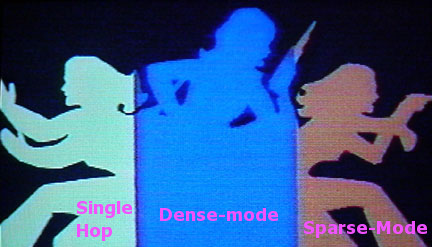
So that makes it kind of a mess. I’ve been teaching basics of FCoE (mostly single-hop) for a bit now, and I think I’ve come across a way to simplify perception of FCoE: Realize FCoE is implemented in three different ways.

  • Single-hop FCoE (SHFCoE)
  • Dense-mode FCoE (DMFCoE) [multi-hop]
  • Sparse-mode FCoE (SMFCoE) [multi-hop]

When we talk about FCoE in general, we should be talking about which specific method that’s being referenced. That came to me when I read Ivan Pepelnjak’s article on the two ways to implement multi-hop  FCoE , although I’m also adding single-hop as a separate way to implement FCoE.

While all three ways are technically “FCoE”, they are implemented in very different manners, have very different hardware and topology requirements, and different vendors support different methods. They’re almost three completely different beasts. So let’s talk about them separately, and be specific when we talk about it.

So let’s talk about FCoE.

Single Hop FCoE (SHFCoE)

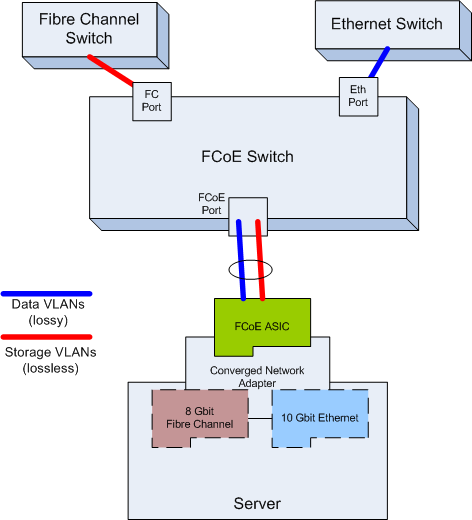
This is the simplest way to implement FCoE, as it doesn’t really require any of the new data center standards on the rest of your network devices. Typically, a pair of switches is enabled for FCoE, as well as some server network/storage adapters known as CNAs (Converged Network Adapter).

In the Cisco realm, this is either a Nexus 5000 series or Fabric Interconnects which are part of the Cisco UCS server system. In HP, this might be part of Virtual Connect. A CNA is a Ethernet/Fibre Channel combo networking card. The server’s operating system is presented with separate  native Ethernet and native Fibre Channel devices, so the OS doesn’t even know that FCoE is going on. It just thinks there’s native Ethernet and native Fibre Channel.

Oh hey, look! An actual diagram. Not just proof you were alive in the 80’s.

Ethernet frames containing FC frames are isolated onto their own FCoE VLANs. When the Ethernet frames reach the FCoE switch they are de-encapsulated and forwarded via regular Fibre Channel methods to their final destination as native Fibre Channel.

This method has been in place for a few years now, and it works (and works well). It’s pretty well understood, and there’s plenty of stick time for it. You also don’t need to do anything special on your Ethernet networks, and most of the time nothing special needs to be done on your Fibre Channel SAN (although NPV/NPIV may be needed to get the FCoE switch connected to the Fibre Channel switch). You don’t have to worry about any of the new DCB standards, such as DCBX, PFC, ETS, etc., because they only need to be on the FCoE single-hop switch, and are already there. No tweaking of those standards is typically necessary.

The Multi-Hops

There are two types of multi-hop FCoE, where the FCoE goes beyond just the initial switch. J Metz from Cisco elaborated on the various definitions (and types) of multi-hop in this great blog article here, but I think we can even make it more simple by saying that multi-hop means more than one FCoE switch.

Dense-Mode FCoE (DMFCoE)

With DMFCoE, a FCoE frame is received at the DMFCoE switch and de-encapsulated into a regular FC frame. The FCF (Fibre Channel Forwarder) portion of the DMFCoE switch makes the forwarding decision and sends it to the next port. At that port, the FC frame is re-encapsulated into an FCoE Ethernet frame and send out an Ethernet port to the next hop.

With DMFCoE, each of your Ethernet switches is also a full-stack Fibre Channel switch. You’re running essentially a Fibre Channel SAN overlay on top of your Ethernet switches. Zoning, name services, FSPF, etc., are all the same as on your regular Fibre Channel network. Also, FCoE frames are routed along not by Ethernet, but by Fibre Channel routing (FSPF) which is multi-path (so no bridging loops).

The drawback is that it requires a pretty advanced switch to do it. In fact, it wasn’t until July of 2011 that Cisco had more than one switch that could even do DMFCoE (the MDS and Nexus 7000 needed 5.2 to do DMFCoE, which wasn’t released until July).

Alternative names for dense-mode FCoE:

  • FC-Forwarded FCoE
  • DMFCoE
  • Full FCoE
  • Heavy FCoE
  • Overlay Mode

Sparse Mode FCoE (SMFCoE)

Sparse Mode FCoE (SMFCoE) is when an Ethernet network forwards FCoE frames via regular Ethernet forwarding mechanisms. Unlike DMFCoE, the Fibre Channel frame is not de-encapsulated (although but it might be snooped with FIP snooping if the switch supports it). For the most part, the Ethernet switches have little to no awareness of the Fibre Channel layers.

The benefit of SMFCoE is that it doesn’t require quite the beefiness that DMFCoE needs, as you don’t need silicon that can understand and forward FCP (Fibre Channel Protocol) traffic. You still need priority flow control and other DCB standards, and probably DCBx (to set up the FCoE lossless CoS and so forth).

The drawback is that you’ll usually need some sort of multi-path Ethernet protocol, such as TRILL/SPB/Fabric Path as spanning-tree would likely be a disaster for a storage protocol. Since none of the potential multi-path Ethernet protocols are in wide use with the various vendors, that makes SMFCoE somewhat dead right now.

Alternative names for SMFCoE might be:

  • Ethernet-forwarded FCoE
  • FCoE light
  • Diet-FCoE

Why Differentiate?

Because it gets damn confusing otherwise. Recently Juniper and Cisco had a dustup about the requirement of TRILL for FCoE. Juniper posted the article on why TRILL won’t scale for data centers, and mentioned that TRILL is required for FCoE. J Metz from Cisco counter-reponded with essentially “no, FCoE doesn’t need TRILL“. Who’s right? Well they both are.

Cisco has gone the DMFCoE route, so no you don’t need TRILL (or other multi-path Ethernet). Since Juniper is going SMFCoE, it will need some sort of multi-path (and his article is calling for QFabric to be that solution).

Whither FCoE?

So can you do FCoE multi-hop right now, either DMFCoE or SMFCoE? It probably would be wise to wait. In the Cisco realm, the code that supports DMFCoE was just released in July for their Nexus 7K and MDS lines, and the 5Ks could have done DMFCoE since December I think (although I don’t know any one that did).

Right now, I don’t know of any customers actually doing mutli-hop FCoE (and I don’t know anyone who’s all that interested).  SMFCoE is a moot point right now until more switches can get multi-path Ethernet, whether that be QFabric, TRILL, SPB or another method.

You Changed, VMware. You Used To Be Cool.

So by now we’ve all heard about VMware’s licensing debacle. The two biggest changes where that VMware would be charging for RAM utilization (vRAM) as well as per CPU, and the free version of ESXi would go from a 256 GB limit to an 8 GB limit.

There was a bit of pushback from customers. A lot, actually. A new term has entered the data center lexicon: vTax, a take on the new vRAM term. VMware sales reps were inundated with angry customers. VMware’s own message boards were swarmed with angry posts. Dogs and cats living together, mass hysteria. And I think my stance on the issue has been, well, unambiguous.

It’s tough to imagine that VMware anticipated that bad of a response. I’m sure they thought there would be some grumblings, but we haven’t seen a product launch go this badly since New Coke.

VMware is in good company

VMware introduced the concept of vRAM, essentially making customers pay for something that had been free. The only bone they threw at customers was the removal of the core limit on processors (previously 6 or 12 cores per CPU depending on the license). However, it’s not more cores most customers need, it’s more RAM.  Physical RAM is usually the limiting factor for increasing VM density on a single host, not lack of cores. Higher VM density means lower power, lower cooling, and less hosts.

VMware knew this, so they hit their customers where it counts. The only way to describe this, no matter how VMware tries to spin it, is a price increase.

VMware argued that the vast majority of customers would be unaffected by the new licensing scheme, that they would pay the same with vSphere 5 as they did with vSphere 4. While that might have been true, IT doesn’t think about right now, they think about the next hardware they’re going to order, and that next hardware is dripping with RAM. Blade systems from Cisco and HP have to ability to cram 512 GB of RAM in them. Monster stand-alone servers can take even more, like Oracle’s Sun Fire X4800 can hold up to 2 TB of RAM. And it’s not like servers are going to get less RAM over time. Customers saw their VMware licensing costs increasing with Moore’s Law. We’re supposed to pay less with Moore’s Law, and VMware figured out a way to make us pay more.

So people were mad. VMware decided to back track a bit, and announced adjusted vRAM allotments and rules. So what’s changed?

You still pay for vRAM allotments, but the allotments have been increased across the board. Even the free version of the hypervisor got ups to 32 GB from 8 GB.

Also, the vRAM usage would be based on a yearly average, so spikes in vRAM utilization wouldn’t increase costs so long as they were relatively short lived. vRAM utilization is now capped at 96 GB, so no matter how large a single VM is, it will only count as 96 GB of vRAM used.

Even with the new vRAM allotments, it’s still a price increase

The adjustments to vRAM allotments have helped quell the revolt, and the discussion is starting to turn from vTax to the new features in vSphere 5. The 32 GB limit for the free version of ESXi also made a lot more sense. 8 GB was almost useless (my own ESXi host has 18 GB of RAM), and given what it costs to power and cool even a basement lab, not even worth powering up. 32 GB means a nice beefy lab system for the next 2 years or thereabouts.

What’s Still Wrong

While the updated vRAM licensing has alleviated the immediate crisis, there is some damage done, some of it permanent.

The updated vRAM allotments make more sense for today, and give some room for growth in the future, but it still has a limited shelf life. As servers get more and more RAM over the next several years, vTax will automatically increase. VMware is still tying their liscensing to a deprecating asset in RAM.

That was part of what got people so peeved about the vRAM model. Even if they ran the numbers and it turned out they didn’t need additional licensing from vSphere 4 right now, most organizations had an eye on their hardware refresh cycle, because servers get more and more RAM with each refresh cycle.

VMware is going to have to continue to up vRAM allotments on a regular basis. I find it uncomfortable to know that my licensing costs could increase as exponentially as RAM becomes exponentially more plentiful as time goes on. I don’t doubt that they will increase allotments, but we have no idea when (and honestly, even if) they will.

You Used to be Cool, VMware

The relationship between VMware and its customers base has also been damaged. VMware had incredible goodwill from customers as a vendor, a relationship that was the envy of the IT industry. We had their back, and we felt they had our back. No longer. Customers and the VMware community will now look at VMware with a somewhat wary eye. Not as wary with the vRAM adjustments, but wary still.

I have to imagine that Citrix and Microsoft have sent VMware’s executives flowers with messages like “thank you so much” and “I’m going to name my next child after you”. I’m hearing anecdotal evidence that interest in HyperV and Citrix Xen has skyrocketed, even with the vRAM adjustments. In the Cisco UCS classes I teach, virtually everyone has taken more than just a casual look at Citrix and HyperV.

Ironically Citrix and Microsoft have struggled to break the stranglehold that VMware had on server virtualization (over 80% market share). They’ve tried several approaches, and haven’t been successful. It’s somewhat amusing that it’s a move that VMware made that seems to be loosening the grip. And remember, part of that grip was the loyal user community.

Thank about how significant that is. Before vSphere 5, there was no reason for most organizations to get “wandering eye”. VMware has the most features and a huge install base, plus plenty of resources and expertise around to have made VMware the obvious choice for most . The pricing was reasonable, so there wasn’t a real need to look elsewhere.

Certainly the landscape for both VMware and the other vendors has changed substantially. It will be interesting to see how it all plays out. My impression is that VMware will still make money, but they will lose market share, even if they stay #1 in terms of revenue (since they’re charging more, after all).

Really? I Need A Mainframe?

On the twitters today I came across a tweet by @mreferre pointing to a blog about mainframes aptly named The Mainframe Blog. The catchphrase for that blog seems to be “blank needs a mainframe”, with links to various outages like those by AWS. So my first thought is…

Are you f#@%ing kidding me?

Actually, no, that wasn’t my first thought. My first thought was Beeper King, Liz Lemon’s boyfriend’s pager business from 30-Rock. A pager store, in the 21st century.

I cut my teeth in the mid to late 90s on the Unix systems that usurped the mainframe. I even took a mainframe class at IBM’s headquarters, installing Linux on LPARS (IBM came out with the first hypervisor in the 60’s after all). It was a weird, bizarre experience. 31-bit Linux. That’s not a typo. 31-bit. And it was painfully slow. Mainframes have a reputation for power, but really the power that they have isn’t in the processors. Or RAM for that matter. Take a look at the specs for the new IBM zEnterprise 114 mainframe system.

10 processors (a variation of the Power7s I believe, fast but not game changing processors) and 256 GB of RAID’d RAM. Only 256 GB and 10 CPUs in a full rack? I can get 512 GB and 2 CPUs into a single blade with a Cisco UCS B230 M2 blade, 8 slots per chassis for 4 TB and 16 CPUs in a chassis, and 6 chassis in a rack. That’s 24 TB of RAM versus 256 GB of RAM, 10 CPUs versus 96 CPUs (960 cores with the new Intel E7’s). 10 CPUs and 256 GB is also the max, so you know it’ll cost an arm and a leg.

I admit, I’m not very schooled on mainframes, and I have minimal stick time on them, but they don’t seem as all that flexible. They seem to me to be designed to do a few very important tasks very reliably (not necessarily fast).  Something like keeping track of money, or airline reservations. But these days even those systems are typically front ended by a web application, not a TN3720 terminal. Given the processing and memory limitations, I don’t think mainframes could possibly handle running web applications in any kind of cost effective or scalable way.

Add to that the cost of mainframes (wheelbarrows of cash), and a host of proprietary storage and networking connections that also cost an arm and a leg. Also, last time I checked, mainframes still booted via a virtual punchcard. Seriously. Most mainframes will have an IBM/Lenovo laptop plugged into them at all times because they can’t boot without them. Probably not any reason not to go mainframe, but it is strange.

Another reason not to trust mainframes. If a computerized voice asks you to play a game, you say no.

Besides, I don’t think “blank needs a mainframe” is usable in all cases. You could say the same thing about Air New Zealand’s outage in 2009, but they had a mainframe. Run by IBM.

I could be wrong about a lot of things in this article, but I just don’t see mainframes as a viable data center technology except for speciality cases. But maybe that’s just me (and everyone else I know).

Free ESXi 5 (vSphere 5 Hypervisor) Now With 32 GB

Update: Check out my buyers/builder’s guide for an inexpensive ESXi host.

Yeah, we all know about the licensing debacle with VMware, and how it dominated the conversation of the vSphere 5 release. A side issue got a bit less attention, however. I’d written previously about the new licensing model screwing home/lab users of the free ESXi hypervisor with the new licensing model by allocating a paltry 8 GB of vRAM. The free version is limited in functionality (which I’m fine with), but the RAM limit used to be 256 GB. When they announced vSphere 5, the free version was then restricted to only 8 GB of vRAM. Dick move.

However, it seems the huge backlash has changed their minds, and they’ve increased the vRAM allocation for the free version of ESXi 5.0 to 32 GB of RAM.

RAM everything around me (get the DIMMs, y’all)

The FAQ still shows the free version with only 8 GB of vRAM, but the updated pricing PDF confirms that it’s actually 32 GB of vRAM allocation, as well as the announcement on VMware’s blog. From the pricing PDF:

Users can remotely manage individual vSphere Hypervisor hosts using the vSphere Client. vSphere Hypervisor is entitled to 32GB of vRAM per server (regardless of the number of processors) and can be utilized on servers with up to 32GB of physical RAM.

I think right now 32 GB for the free version is reasonable, although I think it’s only going to be reasonable for the next 18-24 months.  After that, they’ll need to increase it, and increase it on a regular basis if they continue with vRAM licensing. RAM is a depreciating asset, after all.

This should go a ways to repair a fairly damaged relationship with the VMware advocates such as myself and the VMware user community in general who relied on the free version of ESXi for our home and lab setups. The relationship isn’t quite where it was, to be sure, but it’s improving.

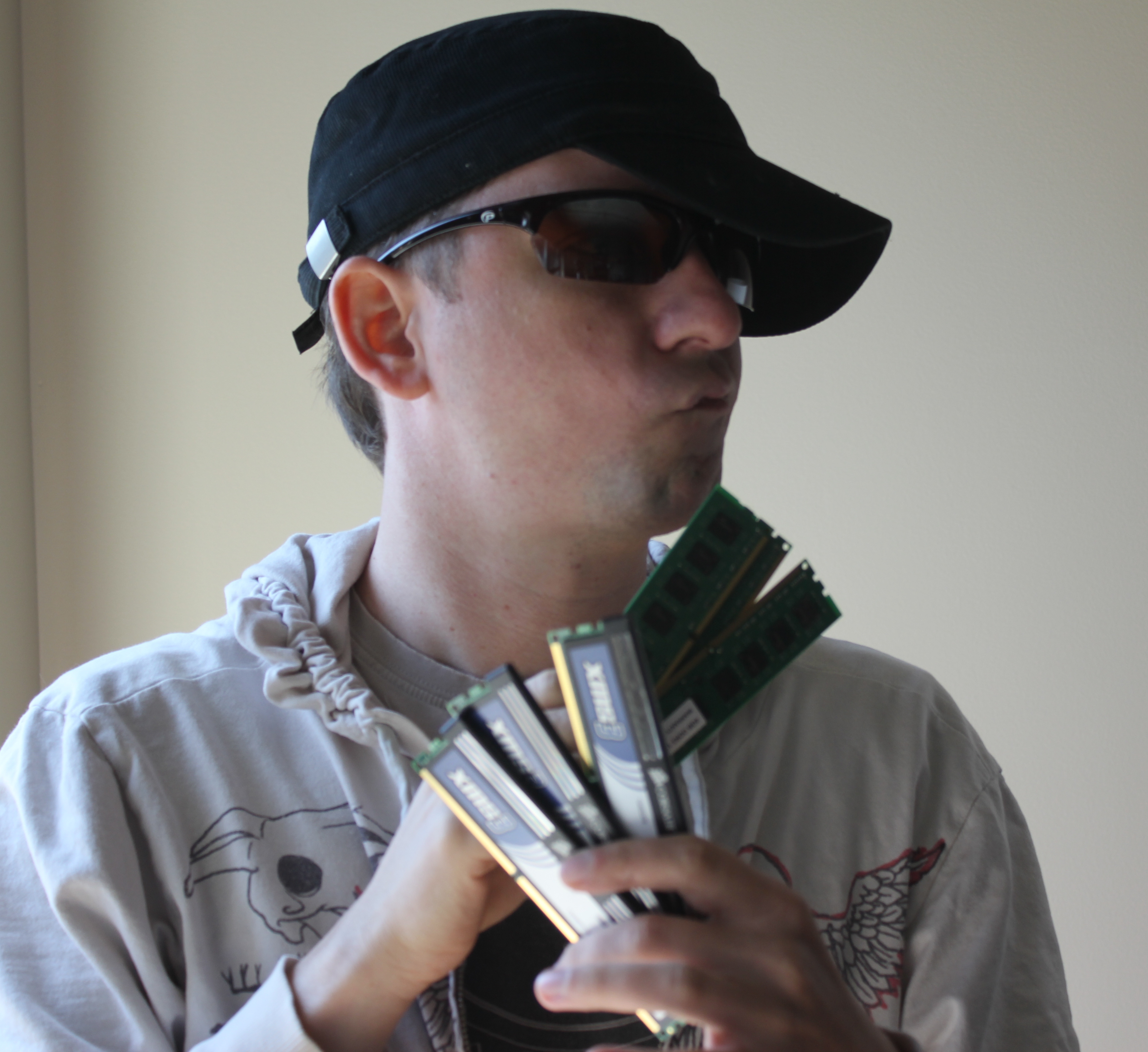
Also, yes that’s me in the picture. That I just took. For this entry. Because that’s how I roll.

The CCIE Datacenter Plan

On the CCIE Data Center (or Centre, if you speak the Queen’s English) front:

The rumor had been that Cisco was going to announce a new CCIE Data Center track, possibly replacing the CCIE SAN track. That didn’t quite happen.

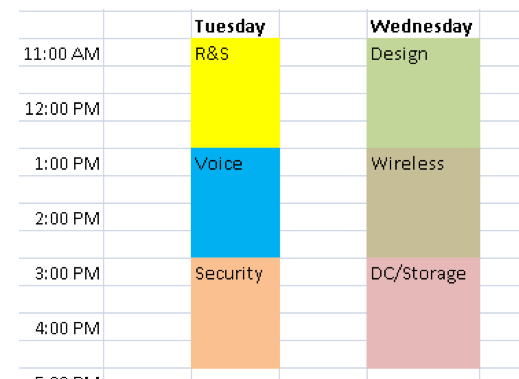
I took a look at the PDF (BRKCCIE-1001_c2_Rev_2.pdf) of the CCIE update presentation (you can take a look yourself for free by going to the  Cisco Live 2011 site). They gave quick overview of the CCIE tracks, an expanded intro to the CCIE SAN track, and mentioned that CCIE SAN will likely be updated in the future with data center subjects like ACE, WAAS, DC switching technologies (QoS, vPC), UCS, etc.

The most promising part of the presentation was the schedule from that presentation, which showed them referring to the CCIE DC/SAN.

Back, and to the left. Back, and to the left.

So a bit of a buzzkill. I was hoping they’d go full bore with a CCIE DC track. It seems it might not be out for a while, perhaps a year before its actually updated to be SAN/DC.  Tom Hollingsworth of Networking Nerds thinks it’s 12-18 months out.

So here’s my plan.  I’m going to finish up my CCNP (ROUTE and TSHOOT to go), and then go for the existing CCIE SAN. That’s probably going to take a year before I’m ready to take the lab. If the CCIE data center track isn’t announced by then, I’ll just take the lab.

They did announce a few details as to what they will likely add to the track:

* ACE
* WAAS
* Cisco UCS

Which is awesome, because I’ve been teaching and consulting with ACE for 3 years now, and teaching Cisco UCS for a year and a half. I got those down pat. About 3 years ago I got TTT (train-the-trainer) for Cisco WAAS, and I think I’m cert’d, but never ended up teaching it. I’m familiar with it, but it’d take some refamiliarization.

Eventually, I’d love to give bootcamps for CCIE DC (CCSI after all).