Po-tay-to, Po-ta-to: Analogies and NPIV/NPV

In a recent post, I took a look at the Fibre Channel subjects of NPIV and NPV, both topics covered in the CCIE Data Center written exam (currently in beta, take yours now, $50!). The post generated a lot of comments. I mean, a lot. Over 50 so far (and still going).  An epic battle (although very unInternet-like in that it was very civil and respectful) brewed over how Fibre Channel compares to Ethernet/IP. The comments look like the aftermath of the battle of Wolf 359.

Captain, the analogy regarding squirrels and time travel didn’t survive

One camp, lead by Erik Smith from EMC (who co-wrote the best Fibre Channel book I’ve seen so far, and it’s free), compares the WWPNs to IP addresses, and FCIDs to MAC addresses. Some others, such as Ivan Pepelnjak and myself, compare WWPNs to MAC addresses, and FCIDs to IP addresses. There were many points and counter-points. Valid arguments were made supporting each position. Eventually, people agreed to disagree. So which one is right? They both are.

Wait, what? Two sides can’t be right, not on the Internet!

When comparing Fibre Channel to Ethernet/IP, it’s important to remember that they are different. In fact, significantly different. The only purpose for relating Fibre Channel to Ethernet/IP is for the purpose of relating those who are familiar with Ethernet/IP to the world of Fibre Channel. Many (most? all?) people learn by building associations with known subjects (in our case Ethernet/IP)  to lesser known (in this case Fibre Channel) subjects.

Of course, any association includes includes its inherent inaccuracies. We purposefully sacrifice some accuracy in order to attain relatability. Specific details and inaccuracies are glossed over. To some, introducing any inaccuracy is sacrilege. To me, it’s being overly pedantic. Pedantic details are for the expert level. Using pedantic facts as an admonishment of an analogy misses the point entirely. With any analogy, there will always be inaccuracies, and there will always be many analogies to be made.

Personally, I still prefer the WWPN ~= MAC/FC_ID ~= IP approach, and will continue to use it when I teach. But the other approach I believe is completely valid as well. At that point, it’s just a matter of preference. Both roads lead to the same destination, and that is what’s really important.

Learning always happens in layers. Coat after coat is applied, increasing in accuracy and pedantic details as you go along. Analogies is a very useful and effective tool to learn any subject.

Cisco ACE: Insert Client IP Address

Source-NAT (also referred to as one-armed mode) is a common way of implementing load balancers into a network. It has several advantages over routed-mode (where the load balancer is the default gateway of the servers), most importantly that the load balancer doesn’t need to be Layer 2 adjacent/on the same subnet as the servers.  As long as the SNAT IP address of the load balancer has bi-directional communication with the IP address of the servers, the load balancer can be anywhere. A different subnet, a different data center, even a different continent.

However, one drawback is that with Source NAT the client’s IP address is obscured. The server’s logs will show only the IP address of the SNAT address(s).

There is a way to remedy that if the traffic is HTTP/HTTPS, and that’s by having the load balancer insert the true source IP address into the HTTP request header from the client. You can do it with the ACE by putting it into the load balance policy-map.

policy-map type loadbalance http first-match VIP1_L7_POLICY
  class class-default
     serverfarm FARM1
     insert-http x-forwarded-for header-value "%is"

But alone is not enough. There are two extra steps you need to take.

The first step is you need to tell the web server to log the x-forwarded-for. For Apache, it’s a configuration file change. For IIS, you need to run an ISAPI filter in IIS.

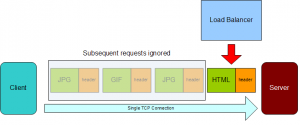
The other thing you need to do is fix the ACE’s attention span. You see, by default the ACE has a short attention span. The HTTP protocol allows you to make multiple HTTP requests on a single TCP connection. By default, the ACE will only evaluate/manipulate the first HTTP request in a TCP connection.

So your log files will look like this:

1.1.1.1 "GET /lb/archive/10-2002/index.htm"
- "GET /lb/archive/10-2003/index.html"
- "GET /lb/archive/05-2004/0100.html HTTP/1.1"
2.2.2.2 "GET /lb/archive/10-2007/0010.html"
- "GET /lb/archive/index.php"
- "GET /lb/archive/09-2002/0001.html"

The “-” indicates Apache couldn’t find the header, because the ACE didn’t insert it. The ACE did add the first source IP address, but every request after it in the same TCP connection was ignored.

Why does the ACE do this? It’s less work for one, only evaluating/manipulating the first request in a connection. Since browsers will make dozens or even hundreds of requests over a single connection, this would be  a significant saving of resources. After all, most of the time when L7 configurations are used, it’s for cookie-based persistence. If that’s the case, all the requests in the same TCP connection are going to contain the same cookies anyway.

How do you fix it? By using a very ill-named feature called persistence-rebalance. This gives the ACE a longer attention span, telling the ACE to look at every HTTP request in the TCP connection.

First, create an HTTP parameter-map.

parameter-map type http HTTP_LONG_ATTENTION_SPAN
  persistence-rebalance

Then apply the parameter-map to the VIP in the multi-match policy map.

policy-map multi-match VIPsOnInterface
  class VIP1
    loadbalance vip inservice
    loadbalance policy VIP1_L7_POLICY
    appl-parameter http advanced-options HTTP_LONG_ATTENTION_SPAN

When that happens, the IP address will show up in all of the log entries.

1.1.1.1 "GET /lb/archive/10-2002/index.htm"
2.2.2.2 "GET /lb/archive/10-2003/index.html"
1.1.1.1 "GET /lb/archive/05-2004/0100.html HTTP/1.1"
2.2.2.2 "GET /lb/archive/10-2007/0010.html"
1.1.1.1 "GET /lb/archive/index.php"
2.2.2.2 "GET /lb/archive/09-2002/0001.html"

But remember, configuring the ACE (or load balancer in general) isn’t the only step you need to perform. You also need to tell the web service (Apache, Nginx, IIS) to use the header as well. None of them automatically use the X-Forwarded-for header.

I don’t know if they’ll try to trick you with this in the CCIE Lab, but it’s something to keep in mind for the CCIE and for implementations.

NPV and NPIV

The CCIE Data Center blueprint makes mention of NPV and NPIV, and Cisco UCS also makes heavy use of both topics, topics that many may be unfamiliar with most. This post (part of my CCIE Data Center prep series) will explain what they do, and how they’re different.

(Another great post on NPV/NPIV is from Scott Lowe, and can be found here. This is a slightly different approach to the same information.)

NPIV and NPV are among the two most ill-named of acronyms I’ve come across in IT, especially since they sound very similar, yet do two fairly different things. NPIV is an industry-wide term and is short for N_Port ID Virtualization, and NPV is a Cisco-specific term, and is short for N_Port Virtualization. Huh? Yeah, not only do they sound similar, but the names give very little indication as to what they do.

NPIV

First, let’s talk about NPIV. To understand NPIV, we need to look at what happens in a traditional Fibre Channel environment.

When a host plugs into a Fibre Channel switch, the host end is called an N_Port (Node Port), and the FC switch’s interface is called an F_Port (Fabric Port). The host has what’s known as a WWPN (World Wide Port Name, or pWWN), which is a 64-bit globally unique label very similar to a MAC address.

However, when a Fibre Channel host sends a Fibre Channel frame, that WWPN is no where in the header. Instead, the host does a Fabric Login, and obtains an FCID (somewhat analagous to an IP addres). The FCID is a 24-bit number, and when FC frames are sent in Fibre Channel, the FCID is what goes into the source and destination fields of the header.

Note that the first byte (08) of the FCID is the same domain ID as the FC switch that serviced the host’s FLOGI.

In regular Fibre Channel operations, only one FCID is given per physical port. That’s it. It’s a 1 to 1 relationship.

But what if you have an ESXi host, for example, with virtual fibre channel interfaces. For those virtual fibre channel interfaces to complete a fabric login (FLOGI), they’ll need their own FCIDs. Or, what if you don’t want to have a Fibre Channel switch (such as an edge or blade FC switch) go full Fibre Channel switch?

NPIV lets a FC switch give out multiple FCIDs on a single port. Simple as that.

The magic of NPIV: One F_Port gives out multiple FCIDs on (0x070100 to the ESXi host and 0x070200 and 0x070300 to the virtual machines)

NPV: Engage Cloak!

NPV is typically used on edge devices, such as a ToR Fibre Channel switch or a FC switch installed in a blade chassis/infrastruture. What does it do? I’m gonna lay some Star Trek on you.

NPV is a clocking device for a Fibre Chanel switch.

Wait, did you just compare Fibre Channel to a Sci-Fi technology? 

How is NPV like a cloaking device? Essentially, an NPV enabled FC switch is hidden from the Fibre Channel fabric.

When a Fibre Channel switch joins a fabric, it’s assigned a Domain_ID, and participates in a number of fabric services. With this comes a bit of baggage, however. See, Fibre Channel isn’t just like Ethernet. A more accurate analogue to Fibre Channel would be Ethernet plus TCP/IP, plus DHCP, distributed 802.1X, etc. Lots of stuff is going on.

And partly because of that, switches from various vendors tend not to get a long, at least without enabling some sort of Interopability Mode. Without interopability mode, you can’t plug a Cisco MDS FC switch into say, a Brocade FC switch. And if you do use interopability mode and two different vendors in the same fabric, there are usually limitations imposed on both switches. Because of that, not many people build multi-vendor fabrics.

Easy enough. But what if you have a Cisco UCS deployment, or some other blade system, and your Fibre Channel switches from Brocade? As much as your Cisco rep would love to sell you a brand new MDS-based fabric, there’s a much easier way.

Engage the cloaking device.

(Note: NPV is a Cisco-specific term, while other vendors have NPV functionality but call it something else, like Brocade’s Access Gateway.) A switch in NPV mode is invisible to the Fibre Channel fabric. It doesn’t participate in fabric services, doesn’t get a domain ID, doesn’t do fabric logins or assign FCIDs. For all intents and purposes, it’s invisible to the fabric, i.e. cloaked. This simplifies deployments, saves on domain IDs, and lets you plug switches from one vendor into a switch of another vendor.  Plug a Cisco UCS Fabric Interconnect into a Brocade FC switch? No problem. NPV. Got a Qlogic blade FC switch plugging into a Cisco MDS? No problem, run NPV on the Qlogic blade FC switch (and NPIV on the MDS).

The hosts perform fabric logins just like they normally would, but the NPV/cloaked switch passes FLOGIs up to the NPIV enabled port on the upstream switch. The FCID of the devices bears the  the Domain ID of the upstream switch (and appears directly attached to the upstream switch).

The NPV enabled switch just proxies the FLOGIs up to the upstream switch. No fuss, no muss. Different vendors can interoperate, we save domain IDs, and it’s typically easier to administer.

TL;DR: NPIV allows multiple FLOGIs (and multiple FCIDs issued) from a single port. NPV hides the FC switch from the fabric.

Don’t Call It A WOC: Infineta Systems

When I was invited along with the other NFD3 delegates to take a look at Infineta, I was prepared for a snooze-fest. After all, WOCs (WAN Optimization Controllers)  have pretty much been played out.

Turns out though, Infineta isn’t a WOC. At least not as we know it.

If you’re not familiar with WAN Optimization Controllers, they are end points where the following takes place between them to increase bandwidth/decrease latency:

  • TCP Flow Optimizatin (TFO): Things like adjusting the TCP windows, SACK, etc.
  • LZ Compression: Compressing data on the fly
  • Deduplication
  • Caching (Usually SMB/CIFS)

The WAN Optimization market has had it’s ups and downs. Around 2006/7, it seemed few things where hotter in the networking world. Riverbed, F5, Bluecoat, and even Cisco were pushing the technology heavily.

In 2007 I got to play with a few of the products out there while evaluating solutions for a financial company. F5’s WANJets were stink-out-loud bad, which was strange from a company that (deservedly) dominates the load balancing market. Cisco had an offering that was pretty good (surprised me) and performed extremely well in our tests. Riverbed performed extermely well and was easier than Cisco to manage.

Vendors were furiously trying to get mobile clients out the door as well, so remote users could have the benefit of all four of the optimizations (TFO, compression, deduplication, caching) on their personal VPN connections.

But this was 2007/2008, so the game has changed since then. Cisco doesn’t seem to be as focused on WAAS as they were. Riverbed is the F5 of the WOC world, very specialized and executing exceptionally well. F5 dropped out, and integrated some of the functionality into the LTMs (BIG-IPs) and didn’t keep the WANJet name, which is good, because it had become a four letter word.

The biggest feature the organizations I was involved in were after weren’t necessarily TFO, compression, or de-dupe. It was what is commonly referred to as CIFS (it’s not CIFS, it’s SMB) caching. The issue is that SMB/CIFS has been a chatty protocol. Opening up a single 2 Mbyte file involves a lot of back-and-forths, and it’s all done serially (no parallelism).  Opening up a 2 Mbyte Word file over 100 ms of latency and a T1 could take minutes (back, forth, back, forth, back forth, etc.)

WOCs solved this issue by implementing SMB caching, allow you to open a file on an SMB share in seconds instead of minutes, even on a congested link. Banks in particular ate this up like candy (a terrifying amount of financial modeling isn’t done on mainframes, super computers, or AI cores, it’s done on Excel spreadsheets).

Oh yeah, no worries. I’m just a 600 teraflop super computer. But hey, if you’re more comfortable putting the fate of capitalism in the hands of Clippy, go for it. Dick.

But this need has waned. Microsoft has introduced BranchCache, which is part of the new version of SMB (formerly CIFS) in Windows Server 2008 R2. An even new version of SMB called SMB v3 has Stephen Foskett exited also adds more BranchCaching abilities.

It looks like you’re trying to implode the world economy

Without the need for SMB caching, WOCs (which are comparatively expensive) look a lot less attractive to a lot of people.  Which leads me to data center.

Infineta is a WOC, although not really. At least, it’s not a WOC as we know it. They’re bag is purely a data center to data center play. They do no SMB caching. They don’t try to put their box in every branch office.

What’s more, it’s not x86, which I found the most interesting. All the WOCs I know are x86-based or virtual machines running on x86 platforms, doing most of the heavy lifting done with x86 CPU cycles (with some hardware offloading  for compression, TOE, etc.).

Instead, the box is full of the same components you’d find in a data center switch. Some merchant switch silicon, and some FPGAs (Field Programmable Gate Arrays, essentially programmable ASICs) that are programmed with the Infinita secret sauce.

But they had a pretty compelling case, going after data center to data center transfers. It’s a smart play I think, given unyeilding desire for all things multi-data center. It’s a tough nut to crack, and when I was designing infrastructure in the late ’90s and earlyer 2000s, every company wanted to have multiple data centers. Few actually went through with it though, because of the expense and complexity of keeping two sites in sync.

They do depupe and compression, although they do it through specalized silicon rather than x86 horsepower. We got a PhD level explanation of the concepts (which you can see here) which almost imploded my brain.

It got a little intense

Then I distracted myself (and Mrs. Y) by going over the other thing that Infineta (and other WOCs) do which is TCP Flow Optimization.

Something that we often forget (myself included) is that a single TCP flow has limits on throughput, based on a number of factors, including window size, latency, segment/packet loss, etc. WOCs in general analyze the latency and tune their TCP paramaters according, and then act as TCP proxies for clients on either end. Infineta takes this to an extreme by being able to push tens of gigs.

It’s an interesting play, and a good market to go after methinks. I’ve yet to talk to end users that have used it, so don’t take this as a product endorsement. I am, however, optimistically curious.

More Info:

Disclaimer: I was invited graciously by Stephen Foskett and Greg Ferro to be a delegate at Networking Field Day 3. My time was unpaid. The vendors who presented indirectly paid for my meals and lodging, but otherwise the vendors did not give me any compensation for my time, and there was no expectation (specific or implied) that I write about them, or write positively about them. I’ve even called a presenter’s product shit, because it was. Also, I wrote this blog post mostly in Aruba while drunk.

TRILLapalooza

If there’s one thing people lament in the routing and switching world, it’s the spanning tree protocol and the way Ethernet forwarding is done (or more specifically, it’s limitations). I’ve made my own lament last year (don’t cross the streams), and it’s come up recently in Ivan Pepelnjak’s blog.  Even server admins who’ve never logged into a switch in their lives know what spanning-tree is: It is the destroyer of uptime, causer of the Sev1 events, a pox among switches.
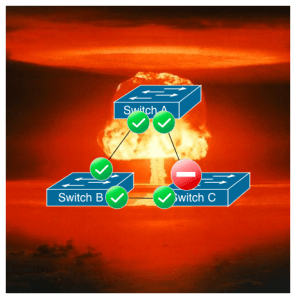
I am become spanning-tree, destroyer of networks

The root of the problem is the way Ethernet forwarding is done: There can’t be more than one path for an Ethernet frame to take from a source MAC to a destination MAC. This basic limitation has not changed for the past few decades.

And yet, for all the outages, all of the configuration issues and problems spanning-tree has caused, there doesn’t seem to be much enthusiasm for the more fundamentals cures: TRILL (and the current proprietary implementations), SPB, QFabric, and to a lesser extent OpenFlow (data center use cases), and others. And although the OpenFlow has been getting a lot of hype, it’s more because VCs are drooling over it than from its STP-slieghing ways.

For a while in the early 2000s, it looked like we might get rid of it for the most part. There was a glorious time when we started to see multi-layer switches that could route Layer 3 as fast as they could switch Layer 2, giving us the option of getting rid spanning-tree entirely. Every pair of switches, even at the access layer, would be it’s own Layer 3 domain. Everything was routed to everywhere, and the broadcast domains were very small so there wasn’t a possibility for Ethernet to take multiple paths. And with Layer 3 routing, multi-pathing was easy through ECMP. Convergence on a failed link was way faster than spanning tree.

Then virtualization came, and screwed it all up. Now Layer 3 wasn’t going to work for a lot o the workloads, and we needed to build huge Layer 2 networks. Although some non-virtualization uses, the Layer-3 everywhere solution works great. To take a look at a wonderfully multi-path, high bandwidth environment, check out Brad Hedlund’s own blog entry on creating a Hadoop super network with shit-tons of bandwidth out of 10G and 40G low latency ports.

Overlays

Which brings me to overlays. There are some that propose overlay networks, such as VXLAN, NVGRE, and Nicira as solutions to the Ethernet multipathing problem (among other problems). An overlay technology like VXLAN not only brings us back to the glory days of no spanning-tree by routing to the access layer, but solves another issue that plagues large scale deployments: 4000+ VLANs ain’t enough. VXLAN for instance has a 24-bit identifier on top of the normal 12-bit 802.1Q VLAN identifier, so that’s 236 separate broadcast domains, giving us the ability to support 68,719,476,736 VLANs. Hrm.. that would be….

While I like (and am enthusiastic) about overlay technologies in general, I’m not convinced they are the  final solution we need for Ethernet’s current forwarding limitations. Building an overlay infrastructure (at least right now) is a more complicated (and potentially more expensive) prospect than TRILL/SPB, depending on how you look at it. Also availability is an issue currently (likely to change, of course), since NVGRE has no implementations I’m aware of, and VXLAN only has one (Cisco’s Nexus 1000v). Also, VXLAN doesn’t terminate into any hardware currently, making it difficult to put in load balancers and firewalls that aren’t virtual (as mentioned in the Packet Pusher’s VXLAN podcast).

Of course, I’m afraid TRILL doesn’t have it much better in the way of availability. Only two vendors that I’m aware of ship TRILL-based products, Brocade with VCS and Cisco with FabricPath, and both FabricPath and VCS only run on a few switches out of their respective vendor’s offerings. As has often been discussed (and lamented), TRILL has a new header format, new silicon is needed to implement TRILL (or TRILL-based) offerings in any switch. So sadly it’s not just a matter of adding new firmware, the underlying hardware needs to support it too. For instance, the Nexus 5500s from Cisco can do TRILL (and the code has recently been released) while the Nexus 5000 series cannot.

It had been assumed that the vendors that use merchant silicon for their switches (such as Arista and Dell Force10) couldn’t do TRILL, because the merchant silicon didn’t. Turns out, that’s not the case. I’m still not sure which chips from the merchant vendors can and can’t do TRILL, but the much ballyhooed Broadcom Trident/Trident+ chipset (BCM56840 I believe, thanks to #packetpushers) can do TRILL. So anything built on on Trident should be able to do TRILL. Which right now is a ton of switches. Broadcom is making it rain Tridents right now. The new Intel/Fulcrum chipsets can do TRILL as well I believe.

And TRILL though does have the advantage of boing stupid easy. Ethan Banks and I were paired up during NFD2 at Brocade, and tasked with configuring VCS (built on pre-standard TRILL). It took us 5 minutes and just a few commands. FabricPath (Cisco’s pre-standard implementation built on TRILL) is also easy: 3 commands. If you can’t configure FabricPath, you deserve the smug look you get from Smug Cisco Guy. Here is how you turn on FabricPath on a Nexus 7K:

switch# config terminal 
switch(config)# feature-set fabricpath
switch(config)# mac address learning-mode conversational vlan 1-10 

Non-overlay solutions to STP without TRILL/SPB/QFabirc/etc. include MLAG (commonly known as Cisco’s trademarked  term Etherchannel) and MC-LAG (Multi-chassis Link Aggregration), also known as VLAG, vPC, VSS depending on the vendor. They also provide multi-pathing in a sense that while there are multiple active physical paths, no single flow will have more than one possible path, providing both redundancy and full link utilization. But it’s all manually configured at each link, and not nearly as flexible (or easy) as TRILL to instantiate. MLAG/MC-LAG can provide simple multi-path scenarios, while TRILL is so flexible, you can actually get yourself into trouble (as Ivan has mentioned here). So while MLAG/MC-LAG work as workarounds, why not just fix what they workaround? It would be much simpler.

Vendor Lock-In or FUD?

Brocade with VCS and Cisco with FabricPath are currently proprietary implementations of TRILL, and won’t work with each other or any other version of TRILL. The assumption is that when TRILL becomes more prevalent, they will have standards-based implementations that will interoperate (Cisco and Brocade have both said they will). But for now, it’s proprietary. Oh noes! Some vendors have decried this as vendor lock-in, but I disagree. For one, you’re not going to build a multi-vendor fabric, like staggering two different vendors every other rack. You might not have just one vendor amongst your networking gear, but your server switch blocks, core/aggregation, and other such groupings of switches are very likely to be single vendor. Every product has a “proprietary boundary” (new term! I made it!). Even token ring, totally proprietary, could be bridged to traditional Ethernet networks. You can also connect your proprietary TRILL fabrics to traditional STP domains at the edge (although there are design concerns as Ivan Pepelnjak has noted).

QFabric will never interoperate with another vendor, that’s their secret sauce (running on Broadcom Trident+ if the rumors are to be believed). Still, QFabric is STP-less, so I’m a fan. And like TRILL, it’s easy. My only complaint about QFabric right now is that it requires a huge port count (500+ 10 Gbit ports) to make sense (so does Nexus 7000K with TRILL, but you can also do 5500s now). Interestingly enough, Juniper’s Anjan Venkatramani did a hit piece on TRILL, but the joke is on them because it’s on tech target behind a register-wall, so no one will read it.

So far, the solutions for Ethernet forwarding are as follows: Overlay networks (may be fantastic for large environments, though very complex), Layer 3 everywhere (doable, but challenges in certain environments), and MLAG/MCAG (tough to scale, manual configuration but workable). All of that is fine. I’ve nothing against any of those technologies. In fact, I’m getting rather excited about VXLAN/Nicira overlays. I still think we should fix Layer 2 forwarding with TRILL, SPB, or something like it. And while even if every vendor went full bore on one standard, it would be several years before we were able to totally rid spanning-tree in our networks.

But wouldn’t it be grand?

Further resources on TRILL (and where to feast on brains)

The VDI Delusion Book Review

Sitting on a beach in Aruba (sorry, I had to rub that one in), I finished Madden & Company’s take on VDI: The VDI Delusion. The book is from the folks at brianmadden.com, a great resource for all things application and desktop delivery-related.

The book title suggests a bit of animosity towards VDI, but that’s not actually how they feel about VDI. Rather, the delusion isn’t regarding the actual technology of VDI, but the hype surrounding it (and the assumption many have that it’s a solve-all solution).

So the book isn’t necessarily anti-VDI, just anti-hype. They like VDI (and state so several times) in certain situations, but in most situations VDI isn’t warranted nor is it beneficial. And they lay out why, as well as the alternative solutions that are similar to VDI (app streaming, OS streaming, etc.).

It’s not a deep-dive technical book, but it really doesn’t need to be. It talks frankly about the general infrastructure issues that come with VDI, as well as delivering other types of desktop services to users across a multitude of organizations.

It’s good for the technical person (such as myself) who deal in an ancillary way with VDI (I’ve dealt with the network and storage aspects, but have never configured a VDI solution), as well as the sales persons and SE that deal with VDI. In that regard, it has a wide audience.

Brian Drew over at Dell I think summed it up the best:  

For anyone dealing with VDI (who isn’t totally immersed in the realities of it and similar technologies) this is a must-read. It’s quick and easy, and really gets down to the details.

OpenFlow’s Awkward Teen Years

During the Networking Field Day 3 (The Nerdening) event, I attended a presentation by NEC (yeah, I know, turns out they make switches and have a shipping OpenFlow product, who knew?).

This was actually the second time I’ve seen this presentation. The first was at Networking Field Day 2 (The Electric Boogaloo), and my initial impressions can be found on my post here.

So what is OpenFlow? Well, it could be a lot of things. More generically it could be considered Software Defined Networking (SDN). (All OpenFlow is SDN, but not all SDN is OpenFlow?) It’s adding a layer of intelligence to a network that we have previously lacked. On a more technical level, OpenFlow is a way to program the forwarding tables of L2/L3 switches using a standard API.

Rather than each switch building their own forwarding tables through MAC learning, routing protocols, and policy-based routing, the switches (which could be from multiple vendors) are brainless zombies, accepting forwarding table updates from a maniacal controller that can perceive the entire network.

This could be used for large data centers, large global networks (WAN), but the NEC demonstration was a data center fabric representation of OpenFlow. In some respects, it’s similar to Juniper’s QFabric and Brocade’s VCS. They all have a boundary, and the connections to networks outside of that boundary is done through traditional routing and switching mechanisms, such as OSPF or MLAG (Multi-chassis Link Aggregation). Juniper’s QFabric is based on Juniper’s own proprietary machinations, Brocade’s VCS is based on TRILL (although not [yet?] interopable with other TRILL implementations), and NEC’s OpenFlow is based on, well, OpenFlow.

While it was the same presentation, the delegates (a few of us had seen the presentation before, most had not) were much tougher on NEC than we were last time. Or at least I’m sure it seemed that way. The fault wasn’t NEC, it was the fact that understanding of Openflow and its capabilities have increased, and that’s the awkward teen years of any technology. We were poking and prodding, thinking of new uses and new implications, limitations and caveats.

As we start to understand a technology better, we start to see it’s potential, as well as probe it’s potential drawbacks. Everything works great in PowerPoint, after all.  So while our questions seemed tougher, don’t take that as a sign that we’re souring on Openflow. We’re only tough because we care.

One thing that OpenFlow will likely not be is a way to manipulate individual flows, or at least all individual flows. The “flow” in Openflow does not necessary (and in all likelihood would rarely, if ever) represent an individual 6 tuple TCP connection or UDP flow (a source and destination MAC, IP, and TCP/UDP port). One of the common issues that Openflow haters/doubters/skeptics have brought up that an Openflow controller can only program about 700 flows per second into a switch. That’s certainly not enough to handle a site that may see hundreds of thousands of new TCP connections/UDP flows per second.

But that’s not what Openflow is meant to do, nor is that a huge issue. Think about routing protocols and Ethernet forwarding mechanisms. Neither handle deal with specific flows, only general flows (all traffic to a particular MAC address goes to this port, this /8 network goes out this interface, etc.). OpenFlow isn’t any different. So a limit of 700 flows per second per switch? Not a big deal.

OpenFlow is another way the build an Ethernet fabric, which means offering services and configurations beyond just a Layer 2/Layer 3 network.

Think of firewalls as how we deal with them now. Scaling is an issue, so they’re often choke points. You have to direct traffic in and out of them (NAT, transparent mode, routed mode), and they’re often deployed in pairs. N+1 firewalls is not that common (and often a huge pain in the ass to configure, although it’s been a while).  With Openflow (or SDN in general) it’s possible to define an endpoint (VM or physical) and say that endpoint requires flows pass through a firewall. Since we can steer flows (again, not on a per-individual flow basis, but general catch-most rules) scaling a firewall isn’t an issue. Need more capacity? Throw another firewall/IPS/IDS on the barbie. Openflow could put in forwarding rules on the switches and steer flows between active/active/active firewalls. These services could also be tied to the VM, and not the individual switch port (which is a characteristic of a fabric).

Myself, I’m all for any technology that abolishes spanning-tree/traditional Layer 2 forwarding. It’s an assbackwards way of doing things, and if that’s how we ran Layer 3 networks, networking administrators would have revolted by now. (I’m surprised more network administrators aren’t outraged by spanning-tree, but that’s another blog post).

NEC’s OpenFlow (and OpenFlow in general) is an interesting direction in the effort to make network more intelligent (aka “fabrics”). Some vendors are a bit dismissive of OpenFlow, and of fabrics in general. My take is that fabrics are a good thing, especially with virtualization. But more on that later. NEC’s OpenFlow product is interesting, but like any new technology it’s got a lot to prove (and the fact that it’s NEC means they have even more to prove).

Disclaimer: I was invited graciously by Stephen Foskett and Greg Ferro to be a delegate at Networking Field Day 3. My time was unpaid. The vendors who presented indirectly paid for my meals and lodging, but otherwise the vendors did not give me any compensation for my time, and there was no expectation (specific or implied) that I write about them, or write positively about them. I’ve even called a presenter’s product shit, because it was. Also, I wrote this blog post mostly in Aruba while drunk.

Common ACE Gotchas

OK, so the Cisco ACE is not my favorite load balancer. It’s certainly not my go-to load balancer when clients come a-callin. It lacks many features that its competitors have, and market share-wise it’s getting its ass handed to it by F5. (And honestly? Deservedly so.)  Also, that blue light will seer your retinas like a fine tofu steak.

This is what the ACE 4710 Appliance’s blue light can do if you’re not careful

But with the Cisco ACE being part of the CCIE Data Center track, it’s kind of like a distant relative who won the lottery: I suddenly find it more interesting.

So my thoughts turn to the CCIE Data Center lab test, and trying to figure out what they could test me on, and I started to think of some of the common gotchas I see in the field in terms of ACE configuration, so I’ve listed a few of them here.

HTTP Health Probes Failed (With Healthy Server)

With the ACE software (including the latest 5.x code) there’s a requirement for an HTTP/HTTPS-based health probe that often trips people up: HTTP status code (min/max). HTTP responses have a status code associated with them, ranging from 200 (OK) to 404 (Not Found) or even 418 “I’m a teapot”. (No seriously, it’s a valid code.) Most load balancers will accept 200 by default, and fail on something 400 or above. But not the ACE. You must explicitly configure what the ACE will accept, or it will accept nothing.

When you configure a health probe in the ACE, it has defaults for URL (/), timeout (10 seconds), and interval (15 seconds). But there’s no default for “expect status”.  If you don’t set it, all health probes will fail, even though the server is perfectly healthy.

No. Probes skipped : 0 Last status code : 200
No. Out of Sockets : 0 No. Internal error: 0
Last disconnect err : Received invalid status code

As you can see in the show probe detail above, the last HTTP response was a 200 (which is good), but the ACE still considered that an invalid status code. The solution is to set the status.

probe http HTTP_PROBE1
 expect status 200 200

Once you do that, it will take the passdetect interval and timeout to mark the server up (default is 1m30s, since the interval and timeout values when a server is down can be different than when a server is considered up). You can have it do it faster by disabling and re-enabling the probe.

Cold Standby

When you upload a certificate and key to the ACE, you typically do so on the active ACE in a HA pair. What a lot of people don’t realize is that you need to upload the certificate and key on both ACEs, and you need to do so before you reference the key and certificate in the configuration file.

If you put the key and certificate in the configuration file, and it doesn’t exist on both the active and standby ACE, the standby goes into a mode called COLD_STANDBY. With COLD_STANDBY, the standby ACE will take over in the even of the active ACE going down, however it no longer accepts configuration updates from the active ACE. You can still failover, but the config could be months old.

  1. Upload certificate and key to active ACE
  2. Upload certificate and key to standby ACE
  3. Go into config mode, setup the ssl-proxy referencing the key and cert.

What happens a lot of the time is people do this:

  1. Upload certifiate and key to active ACE
  2. Go into config mode, setup the ssl-proxy referencing the key and cert
If you don’t do step 2 before step 3, then the ACE will go into STANDBY_COLD mode.

If you’re in STANDBY_COLD (many are and don’t even realize it), make sure all referenced certificates and keys are uploaded to both ACEs, then reboot the standby box or run the command no ft auto-sync run followed by ft auto-sync run. When it comes up, it’ll sync again, and you should be in STANDBY_HOT, which is what you want.

You Forgot the Intermediate Certificate

This isn’t an ACE thing, this is a load balancing thing. As I outlined in my article on SSL and trust, many CAs (including Verisign) require an intermediate certificate in addition to the server certificate you obtain. Both the server and intermediate certificate need to be installed on the ACE (or other load balancer) for the certificate chain to be complete.

This is an often missed step, as it’s not always obvious from the CA if you need one or not, and even when it is explicitly stated, they don’t often tell you which is the right intermediate (some CAs have several to choose from).

Cert Expired: Health Checks Fail

If you’re doing health check against and HTTPS device, and the certificate (whether self signed or certificate authority-signed) has expired, the health checks will fail. Not matter what. So make sure your back end servers don’t have an expired cert.

That’s all I can think of for now. Feel free to post questions or other possible gotchas in the comments section.

Best Effort Fibre Channel

There’s a common misconception about Fibre Channel, in that it only operates in a lossless mode. While it’s true that for many applications, Fibre Channel is used in a totally lossless way (commonly through buffer to buffer credits and other less used mechanisms). But there is a class of service supported by most Fibre Channel switch vendors and HBAs that does allow for less care (and thus dropping) of Fibre Channel frames: Best Effort (Class 9).

There are several classes of service in Fibre Channel. All but one of them is lossless. Most of the time, Fibre Channel runs in Class 3, which provides losslessness through a buffer credit mechanism. Here are all the Fibre Channel classes of service, (although typically just Class 3, 6, and 9 are supported in modern switches):

  • Class 1: Dedicated bandwidth, acknowledged end-to-end
  • Class 2: Shared bandwidth, acknowledged end-to-end
  • Class 3: Shared bandwidth, unacknowledged (lossless handled on a port-to-port basis)
  • Class 4: Virtual circuits, dedicated bandwidth per VC, can be acknowledged or unacknowledged
  • Class 5: Undefined
  • Class 6: Multicast (yuck)
  • Class 9: FC_BE (Best Effort). Shared bandwidth, unacknowledged, lossfull (only lossfull method)

Fibre Channel is usually lossless because it’s running the SCSI protocol as the upper layer protocol, and there’s a widely (but somewhat erroneous) belief that SCSI doesn’t tolerate lost commands well. For some applications, that’s true, loss of a SCSI command is bad. If you’re running a financial institution with an Oracle database or FICON connected mainframe to keep track of financial records, then yes, you’re going to want to run a supported lossless method (typically Class 3).

But there are situations where running Class 9 best effort Fibre Channel may be beneficial. If you’re running a web site with a message board or a Windows server, your SCSI requirements aren’t all that tough. You can lose a SCSI command here or there, and either the application will recover (loading up Battlefield 3) or you just don’t care (troll on a message board).

Class 9 is relatively new, only having been ratified by the T11 working group (under P9FOS committee) in 2005. However since it was designed specifically for existing hardware, only a software update is needed to support it, so most switch and HBA firmware from the major vendors (Cisco, Brocade, Emulex, QLogic, etc.) support it. The idea for a class of lossfull service was in fact inspired by Ethernet.

Fibre Channel, where did you learn to drop frames?

From you, Ethernet, all right? I learned it from watching you!

Turning on Fibre Channel Class 9 (FC_BE, Best Effort) is easy on a Cisco MDS:

switch# conf t 
switch(config)# no system default  
switch(config)# switchport mode F 
switch(config)# switchport class 9 
switch(config)# switchport buffer wred


The mode F turns the port into an F_Port (for an N_Port to plug into), and class 9 makes it class 9. The last command is an important one that most people forget: Turning on WRED (Weighted Random Early Detection). This is a buffer management mechanism that drops frames randomly when a buffer gets close to full. You might be familiar with this mechanism in Ethernet ports as a method to prevent tail drop (leaky bucket) so that TCP performance doesn’t suffer. We’re obviously not running TCP (although you could with IPFC), but tail drop is still bad performance-wise with SCSI.

So why would you wanto to turn on Class 9? Performance mostly. You can get a serious case of HoL (Head of Line) blocking because of congestion somewhere else in the Fabric. Class 9 enables the FIWDI (Fuck It, We’ll Drop It) mechanism when congestion occurs in a fabric.

Congestion on the fabric? Fuck it, we’ll drop the frame!

Note: So as not to pollute Google results, this was of course an April Fools joke. There’s not way anyone who loves Fibre Channel would allow lossfullness.

CCIE Data Center: It’s Official

My twitter mentions was blowing up like a Michael Bay movie about the news that the CCIE Data Center certification was officially-officially announced at Cisco Live! in Melbourne this week. We’ve been teased with it for years, such as thinking we were getting it at Cisco Live last year, but our hopes were dashed. Even when A PDF was found on the Virtual Live site, we were still a little apprehensive.  Now we finally have full on confirmation.

Timeline? Written beta tests will be available in May, and apparently any passing grades there will allow you to take the lab. The CCIE DC Lab will be available September.

I’ll be taking the beta written the first day I possibly can, and likely will take the lab shortly after it’s available.

The equipment/subject list was what we expected from the PDF found at the Cisco Virtual Live website.

Let’s take a look at the equipment list, shall we?

Cisco Catalyst Switch 3750

Hilariously enough, this is the one device in the entire list of devices that I can’t ever remember having logged into. I’ve got Cat 6K experience, but not the 3750s. I’ll have to figure out what I need to know on these guys.

Cisco 2511 Terminal Server

Well, duh. Plenty of experience here, although I could stand to brush up on it. I wonder if they’ll make us set it up, or if it’s transparent to the infrastructure.

MDS 9222i

Interesting choice, instead of an MDS 9500. I’m studying for the CCIE Storage anyway, so this should be good. I don’t see mention of FICON, which is good. Because screw FICON.

Nexus 7009, 5548, 2232 FEX

I’ve taught Nexus before, and I’m still cert’d to do so, I just haven’t in a while. Fortunately, it doesn’t appear that any routing protocols are including in the subject list. I don’t deal with routing on a day-to-day basis, so it’s tough to get practice on them. My old nemesis is listed though, multicast (and IGMP).  FabricPath and OTV are fairly new to me, but I should be able to get up and running on them quickly, especially since FabricPath is TRILL-ish.

Nexus 1000v

I’ve taught Nexus 1000v (DCUCI). Could always use more practice, but I’m good there.

Cisco UCS B-Series, Cisco ACE 4710 Appliance

UCS? ACE? Why Cisco, I thought’d you never ask.

I’ve been teaching ACE for the past 4 years, and I’ve done lab and course development for it. I’ve been teaching UCS almost weekly for the past 2 years, and I’ve also done course and lab development for it. So I’m totally prep’d for this, both written and lab.

I may not even need to study for the UCS and ACE sections. (ed: Bold statement there, buddy.)

Dual Attached JBODs

Need some lab practice on this with the MDS.

Not For Your Laundry Room

One thing is certain, you’re not going to build your own home lab on this. The equipment list is fairly cash intensive, so it’ll be interesting to see how the rental racks get priced out. As soon as I possibly can, I’d love to start teaching CCIE DC boot camps.

Tony’s Take

Now that it’s all official, I’m stoked. This is the CCIE I’ve always dreamed of. A R&S CCIE wouldn’t really help my day-to-day work, and there’s lots of aspects of a R&S that don’t really interest me. Everything about the CCIE DC (except the 3750s perhaps) interests me. Data center was a pretty big gap in Cisco’s certification track (there were a couple of specialization certifications but they don’t have much cachet).

You’ll be seeing a lot of posts from me in regards to my prep for the tests and the lab. Perhaps I’ll put together an ACE workbook. Should be fun.