Ode To MRTG

I was wasting time/procrastinating keeping up with current events on Twitter when I saw a tweet from someone with a familiar name, but I couldn’t quite place where I knew it from: Tobi Oetiker (@oetiker). Then it came to me. He’s the author of the fantastic MRTG, among other tools.

MRTG was my favorite trending utility back in the day. “But Tony, weren’t you a condescending Unix administrator back then, and isn’t MRTG a networking tool?” Yes, yes I was. But MRTG isn’t just for trending network links, you can use it to graph bandwidth in and out of servers as well as other metrics like CPU utilization, memory utilization, number of processes, etc. I had a whole set of standard metrics I would graph with MRTG, depending on the device.

Connection rate, open connections, and bandwidth for an F5 load balancer back when “Friends” was still on the air

MRTG combined with net-snmp (or in Window’s case, the built-in SNMP service) I could graph just about anything on the servers I was responsible for. This saved my ass so many times. Here’s a couple of examples where it saved me:

Customer: “We were down for 5 hours!”

Me: “No, actually your server was down for 5 minutes. Here’s the graph.”

Another customer: “Your network is slow!”

Me: “Our network graphs show very low latency and plenty of capacity. In addition, here’s a graph showing CPU utilization on your servers spiking to 100% for several hours at a time. It’s either time to expand your capacity, or perhaps look at your application to see why it’s using up so many resources.”

In the late 90s, I set up a huge server farm for a major music television network . As part of my automated installs, I included MRTG monitoring for every server’s switch port, server NIC, CPU, memory, as well as other server-relatied metrics. I also graphed the F5 load balancer’s various metrics for all of the VIPs (bandwidth, connection rate). Feeling proud of myself, I showed them to one of the customer’s technical executives thinking they’d look at it and say “oh that’s nice.”

Instead, he called me several times a day for a month asking me (very good) questions about what all the data meant. He absolutely loved it, and I never built a server farm without it (or something like it).

Plenty of tools can show you graphs, but MRTG and tools like it trend not just when you’re looking, but when you’re not. When you’re sleeping, it collects data. When you’re out to lunch, it’s collecting data. When you’re listening to the Beastie Boys or whoever the kids are listening to these day, it collects data. Data that you can pull up at a later date. MRTG was fairly simple, but extremely powerful.

MRTG taught me several important lessons with respect to system monitoring. Perhaps the most important lesson is that monitoring is really two very different disciplines: Trending and alerting. A mistake a lot of operations made was confusing the two. Probably the biggest difference between trending and alerting is that with trending, you can never do too much. With alerting, it’s very easy to over-alert.

How many times have you, in either a server or network administrator role, been the victim of “alert creep”? When alarm after alarm is configured in your network monitoring tool, sending out emails and traps, until you’re so inundated with noise that you can’t tell the difference between the system crying wolf and a real issue?

It’s easy to over-alert. However, it’s very difficult to over-trend. And honestly, trending data is far more useful to me than 99% of alerting. Usually a customer is my best alerting mechanism, they almost always seem to know well before my monitoring system does. And having historical trending data helps me get to the bottom of things much quicker.

Many have improved upon the art of trending with tools like Observium and even RRDTool (also written by Tobi Oetiker). Many more tried but succeeded in only making overly complicated messes that ignored the strength of MRTG which was its simplicity. The simplicity of graphing and keeping various metrics and providing a simple way to get access to them when needed. MRTG was the first killer app for not only network administrators, but server administrators. And it proved how important the old adage is:

If you didn’t write it down, it didn’t happen.

Adobe’s eBook Platform Is A Piece of Shit

Adobe’s eBook platform is utter shit. To those of you that have dealt with ACSM files, that statement is as controversial as saying “the sky is blue”. To those of you that haven’t, and are wondering what makes it such shit, read on.

It all started with a deal that Cisco Press had on cybermonday this year, offering 50% off if you buy three books. As a certified Cisco course instructor (I do not work for Cisco, I just teach Cisco courses) who is also working on my CCIE Storage, I can always do with a few more books, especially if they’re on the recommended reading list for CCIE Storage.

Also, since I travel quite a bit (150,000 miles this year), eBooks are the preferred knowledge delivery vector, since books are, well, frickin’ heavy. I took a nearly 800 page CCNP route book with me all over Europe last year, and it almost killed me. eBooks it is.  I’ve got an iPad, and I absolutely love the Kindle reader app. If I’ve got a long flight ahead of me (such as to say, India) then I make sure I’ve got plenty of books loaded up into my first generation iPad and iPhone 4 (which is also a surprisingly good e-reader). I also have a half decent PDF viewer for non-eBook format documents to read on the road.

I found three eBooks from Cisco Press that fit the bill, loaded them up in my shopping cart, and pulled the trigger. $150 worth of books for $75, not too bad. Two of the books were in an unprotected PDF format (watermarked with my name to discourage rampant sharing, which is fine), the other book downloaded as a tiny little file, with an .acsm extension.

I’d never heard of a .acsm file, but I would soon come to loath those four letters with the burning hatred of a thousand suns. My Canadian friend Jaymie Koroluk (@jaymiek) had this to say about it:

FFUUUUUU indeed. And thus began my Zeldian quest to get a friggin’ eBook on a friggin’ eBook reader. How hard could it be?

Well, of course my Mac didn’t recognize the .acsm file type. I tried loading it into a couple of readers, such as Kindle (it laughed at it) and a PDF viewer that I use. It turns out that .acsm didn’t actually contain the eBook, just a reference to it (and I believe the DRM rights to open the book). I had no idea what to do with it. The Cisco Press site didn’t have any specific instructions that I could find, so I Googled .acsm and eBook.

What I found was link after link that all said essentially “How the fuck do I get an .acsm book onto my reader???” Searching for acsm on Google reveals a world of woe, frustration, and hopelessness.

Google searches for “.acsm”  should just show this

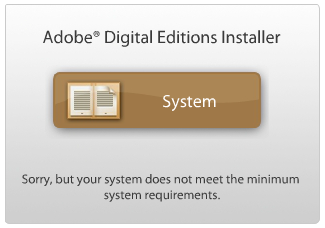
After sifting through a few links, I found out that I needed to download something called Adobe Digital Editions. So I go to Adobe’s site, and I get this is the message I get when I try to download it:

What? I’ve got a new MacBook Air with MacOS Lion. There’s no “here’s what you need to do”, just that obnoxious error. With a bit of digging, I’m able to download it anyway.

I install Adobe Digital Editions, which is not intuitive and bizarrely laid out, and I’m finally able to load up the acsm file, and download a copy of the eBook. And the eBook is… a protected PDF. All that shit for a protected PDF.

But hey, at least I got it, right? Horray! But wait, I can only read it on my laptop, however. I need to get it on my iPad for this book to be of any use.

Yes, I’ve just experienced the eBook version of “The Princess is in another castle”.

But I told her to meet me here like five… fine. You know what? Tell here she’s on her own. I’m gonna go find a girl who can manage to stay un-kidnapped for say, 30 minutes at a time. 

Laptops are generally not great eBook readers, because among other issues, the batteries don’t last as long. The iPad’s battery lasts 10 hours of active use, and the various Kindle readers have their active battery life measured in days.  If I can’t find a way to get this onto my iPad, then there’s not much point in me having spent the money for this book.

I try to find some iPad app at the App Store that reads that format, that would allow me to open the protected PDF, but I came up blank. Or at least, none of them would obviously work. And most of them cost money, so I wasn’t about to do trial and error on which ones might work.

Jaymie mentioned she found an app called txtr, which I downloaded an installed. Txtr apparently was a failed ebook reader, and moved to a purely software play. They also had the ability to read Adobe eBooks (and as far as I can tell, the only iPad app that can). So Finally, I’m able to read the eBook on my iPad.

All told, it takes me over an hour and lots of tinkering, installing, and Googling to get an Adobe eBook onto my iPad.

So how does the Adobe eBook platform compare to other eBook platforms when you finally get the fucking book loaded up on your fucking eBook reader (which again, should not be nearly as difficult as it was)? Let’s compare.

First, ease of getting a book. How long does it take me to get an eBook on the Kindle, iBook, or Nook platforms? About 10 fucking seconds with a decent Internet connection. On Adobe’s platform? About an hour. By my math, Adobe’s platform is 360 times worse than the competition.

So how about usability? The book is a PDF, and PDFs are not ideal as a book format, even the non-DRMd ones that can be opened up on any reader. They’re just not optimized for eReaders and it shows. When you turn a page, the page is blurry for a split second before coming into focus. You can’t zoom in on individual photos like you can with the other readers. And there are about a dozen other nit-picky yet important UI niceties that Kindle and the others have that a PDF eBook lacks. Adobe’s platform seems like they took their existing PDF format, and slapped an eBook layer onto it in a half-assed manner.

In studying for my CCIE Storage, I came across a fantastic free Fibre Channel eBook from EMC (the storage vendor). It’s in an unprotected PDF format, but I’d happily pay $10 to get it in the Kindle format, which is much more conducive to eBook formats.

Final Thoughts

I have a simple plea to anyone thinking of publishing an eBook: For the love of all that is sacred and good in the world, do not use the Adobe book format. It will annoy your readers, and severely limit your eBook sales.

Adobe either has no clue about the eBook market, or they’re trying to sabotage it with a platform so shitty, so mind-bogglingly difficult for even tech-savvy consumers, that no one will ever want to read an eBook ever again.

That’s right, sometimes you have a product so bad, that it doesn’t just leave a bad taste in your mouth, it actually does harm to the industry. And that’s what we have with Adobe.

So Adobe, what did eBooks ever do to you?

BYOD And Juniper’s Big Brother

Twitter fight!

I’ve been involved in a few twitter fights discussions recently, which are typically passionate conversations with people that hold passionate beliefs.  However, the problem with arguing on Twitter is that it’s very easy to accidentally be on the same side, while thinking you’re on opposite sides. Such is the limit of 144 characters.

The whole brouhaha started with a tweet I made about Junos Pulse from Juniper, which can do the following (from the Pulse PDF brochure): “SMS, MMS, email, and message content monitoring, phone log, address book, and stored photo viewing and control.”

Junos Pulse is Juniper’s mobile security client, which includes VPN as well as anti-malware capabilities. It also has the ability to peer into the text messages that a phone has sent and received, as well as view all photographs taken by the smarphone or tablet’s camera. Juniper is not just marketing it towards corporate issued phones and tablets (which I have no problem with), but also (as shown in the  fear-mongering blog post with a misleading title that I  wrote about in my last post) is advocating that employee-owned devices, part of the BYOD (bring your own device) trend in IT, also be loaded with Juniper’s spy-capable software. From the fear-mongering article (emphasis mine):

Get mobile security and device management for your personal or corporate-issued mobile device, and mandate that all of your employees – or anyone for that matter who accesses your corporate network from a mobile device – load mobile security and device management on their mobile devices!

If the phone or tablet is issued by the company, I don’t have any problem with this (so long as employees know that there is that capability). This could even be quite handy, depending on the scenario. But employee owned equipment being susceptible to spying by corporate IT? No way. I can’t imagine anyone would allow that on their personal devices. Even Juniper employees.

(Related: Check out Tom Hollingsworth’s post on BYOD)

Hence my tweet, wondering if Juniper eats its own dog food, and requires employees who bring their personal, non-Juniper-owned smartphones into the office to run Pulse with the ability to view photos, texts, and other personal correspondence. I got responses like this:

I don’t think he realized that I was talking about Juniper pulse having the ability not just to spy on VPN traffic (which any VPN software could), but also the text messages and photos on the mobile device/tablet. Also that Juniper is marketing it towards employee owned devices. (Also, privacy concerns are not a legitimate reason to spy on someone.) In the end though, I think Virtual_Desktop and I were on the same page.

So it’s not just a company that I worry about violating an employees privacy, but also a rogue IT employee. I worked at a place once where a Unix admin stalked another employee by reading her email. Having the power to peer into someone’s personal texts, emails, and photos would be very tempting, and difficult to resist for the unscrupulous.

Ah, I see Tony is getting more saucy texts from his super model girlfriends

I get that if I’m at the office, and I’m using their network, that my traffic could be monitored. I get that data on company property, such as a company issued laptop, phone, or tablet is fair game for viewing by the company. But to require an employee to install something on their personal (BYOD) devices that has the ability to peer into an employee’s personal texts and images? That’s downright scary. And stupid. No knowledgable employee would let that happen. If an employer required that I install it on a device I brought into the office even if it didn’t connect to the corporate network, I’d leave the device at home. And I’d probably look for another job, because bone-headed decisions like that don’t exactly evoke confidence in management.

Junos Pulse certainly has some appropriate use cases. The ability to wipe a phone, view emails, texts and images, and other fairly intrusive activities on a company-owned device make sense in some cases. In others, it’s probably overly intrusive, overly-controlling, but within an employers rights. But on an employee’s personal device? No way.

I like Juniper, I really do. But I think they’ve got the strategy wrong for Pulse, and I think they’ll figure it out. It’s a much larger issue as well, with the consumerization of IT and employees bringing their own devices, the demarkation point between employee and employer is becoming hazy. That’s probably an offshoot of the time an employee is on the clock and off the clock becoming hazy as well. We’ll have to see where this goes, but I don’t think people are going to put up with the  “it’s going to spy on your personal device” route.

It May Already Be Too Late!

I’m very enthusiastic about anything that makes corporate IT suck less (such as BYOD, Bring Your Own Device), and despite not working for any company other than myself, I’m still quite sensitive to things that increase IT suckitude. And I’ve found the later recently in a blog post over at Juniper called “BYOD Isn’t As Scary As You Think, Mr. or Ms. CIO“.

The title of the article seems to say that BYOD isn’t scary for corporate environments. But the article reads as if the author intended to induce a panic attack.

The article is frustrating for a couple of reasons. One, CIOs might take that shit seriously, and while huffing on a paper bag because of panic-induced hyperventilation, might fire off a new bone-headed security policy. One would hope that someone at the CIO level would know better, but I’ve known CIOs that don’t.

Two, one of the great things about smart phones is the lack of shitty security products on them. And you want to go ruin that? If I’m bringing my own device, with saucy texts from my supermodel girlfriends, I’m not likely to let any company put anything on my phone.

Why Ensign Ro, those are not bridge-duty appropriate texts you’re sending to Commander Data

Three, of the possible security implications with smart phones, only a couple of edge cases would even be solved by the software that Juniper offers as a solution. For instance, the threat of a rogue employee. You used to be able to tell if you were let go because your passwords didn’t work, now you could know when your phone reboots and wipes. But how do you know they’ve gone rogue? Why, monitor photos and texts on that employee’s phone of course.

Wait, what?

You can monitor emails, texts, and camphone images? With Junos Pulse mobile security, you can.

Hi there Brett Favre, Big Brother here. We, uhh, couldn’t help but notice that photo you texted from your personal phone that we are always monitoring…

This is just making corporate security, which already sucks, even worse. It’s a mentality that is lose-lose. The IT organization would get additional complexity for very little gain, and the users would get more hindrance, little security, and a huge invasion of privacy. Maybe I’m alone in this, but if any company offered me a job and required my personal device be subjected to this, the compensation package would need to include a mega-yacht to make it worthwhile.

I’ve been self employed since 2007, and having been free of corporate laptop builds, moldy email systems, and maniacal IT managers, I can say this: Being independent is 30% about calling the shots on my own schedule, 70% is calling the shots on my own equipment.

“That’s a very attractive offer, however judging from that crusty-ass laptop you have an the bizarre no-Mac policy by your brain-dead IT head/security officer, working for your company would eat away at my soul and cause me to activate the genesis device out of frustration.”

I really like Juniper, I do. But one of the things you do with friends is call them on their shit. I do it with Cisco all the time, now it’s Juniper’s turn.

A Tale of Two FCoEs

A favorite topic of discussion among the data center infrastructure crowd is the state of FCoE. Depending on who you ask, FCoE is dead, stillborn, or thriving.

So, which is it? Are we dealing with FUD or are we dealing with vendor hype?  Is FCoE a success, or is it a failure? The quick answer is.. yes? FCoE is both thriving, and yet-to-launch. So… are we dealing with Schrödinger’s protocol?

Note quite. To understand the answer, it’s important to make to make the distinction with two very different ways that FCoE is implemented: Edge FCoE and Multi-hop FCoE (a subject I’ve written about before, although I’ve renamed things a bit).

Edge FCoE

Edge FCoE is thriving, and has been for the past few years. Edge FCoE is when you take a server (or sometimes a storage array), connect it to an FCoE switch. And everything beyond that first switch is either native Fibre Channel or native Ethernet.

Edge FCoE is distinct from Multi-hop for one main reason: It’s a helluva lot easier to pull off than multi-hop FCoE. With edge-FCoE, the only switch that needs to understand FCoE  is that edge FCoE switch. They plug into traditional Fibre Channel networks over traditional Fibre Channel links (typically with NPV mode).

Essentially, no other part of your network needs to do anything you haven’t done already. You do traditional Ethernet, and traditional Fibre Channel. FCoE only exists in that first switch, and is invisible to the rest of your LAN and SAN.

Here are the things you (for the most part) don’t have to worry about configuring on your network with Edge FCoE:

  • Data Center Bridging (DCB) technologies
    • Priority Flow Control (PFC) which enables lossless Ethernet
    • Enhanced Transmission Selection (ETS) allowing the ability to dedicate bandwidth to various traffic (not required but recommended -Ivan Pepelnjak)
    • DCBx: A method to communicate DCB functionality between switches over LLDP (oh, hey, you do PFC? Me too!)
  • Whether or not your aggregation and core switches support FCoE (they probably don’t, or at least the line cards don’t)

There is PFC and DCBx in the server-to-edge FCoE link, but it’s typically inherint, and supported by the CNA and the edge-FCoE switch and turned on by default or auto-detected. In some implementations, there’s nothing to configure. PFC is there, and un-alterable. Even if there are some settings to tweak, it’s generally easier to do it on edge ports than on a aggregation/core network.

Edge FCoE is the vast majority of how FCoE is implemented today. Everyone from Cisco’s UCS to HP C7000 series can do it, and do it well.

Multi-Hop

The very term multi-hop FCoE is controversial in nature (just check the comments section of my terminology FCoE article), but for the sake of this article, multi-hop FCoE is any topological implmentation of FCoE where FCoE frames move around a converged network beyond a single switch.

Multi-hop FCoE requires a couple of things: It requires a Fibre Channel-aware network, losslessness through priority flow control (PFC), DCBx (Data Center Bridging Exchange), enhanced transmission selection (ETS),  and you’ve got a recipe for a switch that I’m pretty sure ain’t in your rack right now. For instance, the old man of the data center, the Cisco Catalyst 6500, doesn’t now, and will likely never do FCoE.

Switch-wise, there are two types of ways to do multi-hop FCoE: A switch can either forward FCoE frames based on the Ethernet headers (MAC address source/destination), or you can forward frames based on the Fibre Channel headers (FCID source/destionation).

Ethernet-forwarded/Pass-through Multi-hop

If you build a multi-hop network with switches that forward based on Ethernet headers (as Juniper and Brocade do), then you’ll want something other than spanning-tree to do loop prevention and enable multi-pathing. Brocade uses a method based on TRILL, and Juniper uses their proprietary QFabric (based on unicorn tears).

Ethernet-forwaded FCoE switches don’t have a full Fibre Channel stack, so they’re unaware of what goes on in the Fibre Channel world, such as zoning and with the exception of the FIP (FCoE Initiation Protocol), which handles discovery of attached Fibre Channel devices (connecting virtual N_Ports to virtual F_Ports).

FC-Forwarded/Dual-stack Multi-hop

If you build a multi-hop network with switches that forward based on Fibre Channel headers, your FCoE switch needs to have both a full DCB-enabled Ethernet stack, and a full Fibre Channel stack. This is the way Cisco does it on their Nexus 5000s, Nexus 7000s, and MDS 9000 (with FCoE line cards), although the Nexus 4000 blade switch is the Ethernet-forwarded kind of switch.

The benefit of using a FC-Forwarded switch is that you don’t need a network that does TRILL or anything fancier than spanning-tree (spanning-tree isn’t enabled on any VLAN that passes FCoE). It’s pretty much a Fibre Channel network, with the ports being Ethernet instead of Fibre Channel. In fact, in Cisco’s FCoE reference design, storage and networking traffic are still port-gaped (a subject of a future blog post). FCoE frames and regular networking frames don’t run over the same links, there are dedicated FCoE links.

It’s like running a Fibre Channel SAN that just happens to sit on top of your Ethernet network. As Victor Moreno the LISP project manager at Cisco says: “The only way is to overlay”.

State of FCoE

It’s not accurate to say that FCoE is dead, or that FCoE is a success, or anything in between really, because the answer is very different once you separate multi-hop and edge-FCoE.

Currently, multi-hop has yet to launch in a significant way. In the past 2 months, I have heard rumors of a customer here or there implementing it, but I’ve yet to hear any confirmed reports or first hand tales. I haven’t even configured it personally. I’m not sure I’m quite as wary as Greg Ferro is, but I do agree with his wariness. It’s new, it’s not widely deployed, and that makes it riskier. There are interopability issues, which in some ways are obviated by the fact no one is doing Ethernet fabrics in a multi-vendor way, and NPV/NPIV can help keep things “native”. But historically, Fibre Channel vendors haven’t played well together. Stephen Foskett lists interopability among his reasonable concerns with FCoE multi-hop. (Greg, Stephen, and everyone else I know are totally fine with edge FCoE.)

Edge-FCoE is of course vibrant and thriving. I’ve configured it personally, and it works easily and seamlessly into an existing FC/Ethernet network. I have no qualms about deploying it, and anyone doing convergence should at least consider it.

Crystal Ball

In terms of networking and storage, it’s impossible to tell what the future will hold. There are a number of different directions FCoE, iSCSI, NFS, DCB, Ethernet Fabrics, et all could go. FCoE could end up replacing Fibre Channel entirely, or it could be relegated to the edge and never move from there. Another possibility as suggested to me by Stephen Foskett is that Ethernet will become the connection standard for Fibre Channel devices. They would still be called Fibre Channel switches, and SANs setup just like they always have been, but instead of having 8/16/32 Gbit FC ports, they’d have 10/40/100 Gbit Ethernet ports. To paraphrase Bob Metcalfe, “I don’t know what will come after Fibre Channel, but it will be called Ethernet”.

I, For One, Welcome Our New OpenFlow Overlords

When I first signed up for Networking Field Day 2 (The Electric Boogaloo), I really had no idea what OpenFlow was. I’d read a few articles, listened to a few podcasts, but still only had a vague idea of what it was. People I respect highly like Greg Ferro of Packet Pushers were into it, so it had my attention. But still, not much of a clue what it was. I attended the OpenFlow Symposium, which preceeded the activites of Networking Field Day 2, and had even less of an idea of what it was.

Then I saw NEC (really? NEC?) do a demonstration. And my mind was blown.

Side note: Let this be a lesson to all vendors. Everything works great in a PowerPoint presentation. It also conveys very little about what a product actually does. Live demonstrations are what get grumpy network admins (and we’re all grumpy) giddy like schoolgirls at  Justin Bieber concert. You should have seen Ivan Pepelnjak

I’m not sure if I got all my assumptions right about OpenFlow, so feel free to point out if I got something completely bone-headedly wrong. But from what I could gather, OpenFlow could potentially do a lot of things:

  • Replace traditional Layer 2 MAC learning and propagation mechanisms
  • Replace traditional Layer 3 protocols
  • Make policy-based routing (routing based on TCP/UDP port) something useful instead of a one-off, pain in the ass, ok just-this-one time creature it is now
  • Create “traceroute on steroids”

Switching (Layer 2)

Switching is, well, rather stupid. At least learning MAC addresses and their locations are. To forward frames, switches need to learn which ports to find the various MAC addresses. Right now the only way they learn about it is listening to the cacophony of hosts broadcasting and spewing frames. And when one switch learns a MAC address, it’s not like it tells the others. No, in switching, every switch is on its own for learning. In a single Layer 2 domain, every switch needs to learn where to find every MAC address on its own.

Probably the three biggest consequences of this method are as follows

  • No loop avoidance. The only way to prevent loops is to prevent redundant paths (i.e. spanning-tree protocol)
  • Every switch in a Layer 2 domain needs to know every frickin’ MAC address. The larger the Layer 2 domain, the more MAC addresses need to be learned. Suddenly, a CAM table size of 8,000 MAC addresses doesn’t seem quite enough.
  • Broadcasts like woah. What happens when a switch gets a frame that it doesn’t have a CAM entry for? BROADCAST IT OUT ALL PORTS BUT THE RECEIVING PORT. It’s the all-caps typing of the network world.
For a while in the early 2000’s we could get away with all this. Multi-layer switches (switches that did Layer 3 routing as well) got fast enough to route as fast as they could switch, so we could easily keep our Layer 2 domains small and just route everything.

That is, until VMware came and screwed it all up. Now we had to have Layer 2 domains much larger than we’d planned for. 4,000 entry CAM tables quickly became cramped.

MAC learning would be more centralized with OpenFlow. ARP would still be there at the edge, so a server would still think it was communicating with a regular switch network. But OpenFlow could determine which switches need to know what MAC addresses are where, so every switch doesn’t need to learn everything.

And no spanning-tree. Loop avoidance is prevented by the OpenFlow controller. No spanning-tree (although you can certainly do spanning-tree at the edge to communicate with legacy segments).

Routing (Layer 3)

Routing isn’t quite as stupid as switching. There are a number of good protocols out there that will scale pretty well, but it does require configuration on each device. It’s dynamic in that it can do multi-pathing (where traditional Layer 2 can’t), as well as recover from dead links without taking down the network for several (dozens of) seconds.  but it doesn’t quite allow for centralized control, and it has limited dynamic ability. For instance, there’s not mechanism to do “oh, hey, for right now why don’t we just move all these packets from this source to that source” in an efficient way. Sure, you can inject some host routes to do that, but it’s got to come from some sort of centralized controller.

Flow Routing (Layer 4)

So why stop at Layer 3? Why not route based on TCP/UDP header information? It can be done with policy-based routing (PBR) today, but it’s not something that can be communicated from router to router (OSPF cares not how you want to direct a TCP port 80 flow versus a TCP port 443 flow).  There is also WCCP, the Web Cache Communication Protocol, which today is not used for web caches, but WAN Optimization Controllers, like Cisco’s WAAS, or Cisco’s sworn enemy, Riverbed (seriously, just say the word ‘Riverbed’ at a Cisco office).

Sure it’s watery and tastes like piss, but at least it’s not policy-based routing

A switch with modern silicon can look at Layer 3 and Layer 4 headers as easily as they can look at Layer 2 headers. It’s all just bits in the flow, man. OpenFlow takes advantage of this, and creates, for lack of a cooler term, a Layer 2/3/4 overlord.

I, for one, welcome our new OpenFlow overlords

TCAMs or shared memory, or whatever you want to call the forwarding tables in your multi-layer switches can be programmed at will by an OpenFlow overlord, instead of being populated by the lame-ass Layer 2, Layer 3, and sometimes Layer 4 mechanisms on a switch-by-switch basis.

Since we can direct traffic based on flows throughout a multi-switch network, there’s lots of interesting things we can do with respect to load balancers, firewalls, IPS, caches, etc. Pretty interesting stuff.

Flow View (or Traceroute on Steroids)

I think one of the coolest demonstrations from NEC was when they showed the flow maps. They could punch up any source and destination address (IP or MAC) and there would be a graphical representation of the flow (and which devices they went through) on the screen. The benefits for that would be obvious. Server admin complain about slowness? Trace the flow, and check the interfaces on all the transit devices. That’s something that might take quite a while in a regular route/switch network, but can be done in a few seconds with an OpenFlow controller.

An OpenFlow Controller Tracks a Flow

To some extent, there are other technologies that can take care of some of these issues. For instance, TRILL and SPB take a good wack at the Layer 2 bullshit. Juniper’s QFabric does a lot of the ain’t-nothin-but-a-tuple thang and switches based on Layer2/3 information. But in terms of potential, I think OpenFlow has them all beat.

Don’t get too excited right now though, as NEC is the only vendor that has working implementation of OpenFlow controller, and other vendors are working on theirs. Standford apparently has OpenFlow up and running in their environment, but its all still in the early stages.

Will OpenFlow become the future? Possibly, quite possibly. But even if what we now call OpenFlow isn’t victorious, something like it will be. There’s no denying that this approach, or something similar, is a much better way to handle traffic engineering in the future than our current approach. I’ve only scratched the surface of what can be done with this type of network design. There’s also a lot that can be gained in terms of virtualization (an OpenFlow vSwitch?) as well as applications telling the network what to do. Cool stuff.

Note: As a delegate/blogger, my travel and accommodations were covered by Gestalt IT, who vendors paid to have spots during the Networking Field Day. Vendors pay Gestalt IT to present, so while my travel (hotel, airfare, meals) were covered indirectly by the vendors, no other remuneration (save for the occasional tchotchke) from any of the vendors, directly or indirectly, or by Gestalt IT was recieved. Vendors were not promised, nor did they ask for any of us to write about them, or write about them positively. In fact, we sometimes say their products are shit (when, to be honest, sometimes they are, although this one wasn’t). My time was unpaid. 

The Problem

One recurring theme from virtually every one of the Network Field Day 2 vendor presentations last week (as well as the OpenFlow symposium) was affectionately referred to as “The Problem”.

It was a theme because, as vendor after vendor gave a presentation, they essentially said the same thing when describing the problem they were going to solve. For us the delegates/bloggers, it quickly went from the problem to “The Problem”. We’d heard it over and over again so often that during the (5th?) iteration of the same problem we all started laughing like a group of Beavis and Butt-Heads during a vendor’s presentation, and we had to apologize profusely (it wasn’t their fault, after all).

Huh huhuhuhuhuh… he said “scalability issues”

In fact, I created a simple diagram with some crayons brought by another delegate to save everyone some time.

Hello my name is Simon, and I like to do draw-wrings

But with The Problem on repeat it became very clear that the majority of networking companies are all tackling the very same Problem. And imagine the VC funding that’s chasing the solution as well.

So what is “The Problem”? It’s multi-faceted and interrelated set of issues:

Virtualization Has Messed Things Up, Big Time

The biggest problem of them all was caused by the rise of virtualization. Virtualization has disrupted much of the server world, but the impact that it’s had on the network is arguably orders of magnitude greater. Virtualization wants big, flat networks, just when we got to the point where we could route Layer 3 as fast as we could switch Layer 2. We’d just gotten to the point where we could get our networks small.

And it’s not just virtualization in general, much of its impact is the very simple act of vMotion. VMs want to keep their IPs the same when they move, so now we have to bend over backwards to get it done. Add to the the vSwitch sitting inside the hypervisor, and the limited functionality of that switch (and who the hell manages it anyway? Server team? Network team?)

4000 VLANs Ain’t Enough

If you’re a single enterprise running your own network, chances are 4000+ VLANs are sufficient (or perhaps not). In multi-tenant environments with thousands of customers, 4000+ VLANs quickly becomes a problem. There is a need for some type of VLAN multiplier, something like QinQ or VXLAN, which gives us 4096 times 4096 VLANs (16 million or so).

Spanning Tree Sucks

One of my first introductions to networking was accidentally causing a bridging loop on a 10 megabit Ethernet switch (with a 100 Mbit uplink) as a green Solaris admin. I’d accidentally double-connected a hub, and I noticed the utilization LED on the switch went from 0% to 100% when I plugged a certain cable in. I entertained myself with plugging in and unplugging the port to watch the utilization LED flucutate (that is, until the network admin stormed in and asked what the hell was going on with his network).

And thus began my love affair with bridging loops. After the Brocade presentation where we built a TRILL-based Fabric very quickly, with active-active uplinks and nary a port in blocking mode, Ethan Banks became a convert to my anti-spanning tree cause.

OpenFlow offers an even more comprehensive (and potentially more impressive) solution as well. More on that later.

Layer 2 Switching Isn’t Scaling

The current method by which MAC addresses are learned in modern switches causes two problems: Only one viable path can be allowed at a time (only way to prevent loops is to prevent multiple paths by blocking ports), and large Layer 2 networks involve so many MAC addresses that it doesn’t scale.

From QFabric, to TRILL, to OpenFlow (to half a dozen other solutions), Layer 2 transforms into something Layer 3-like. MAC addresses are routed just like IP addresses, and the MAC address becomes just another tuple (another recurring word) for a frame/packet/segment traveling from one end of your datacenter to another. In the simplest solution (probably TRILL?) MAC learning is done at the edge.

There’s A Lot of Shit To Configure

Automation is coming, and in a big way. Whether it’s a centralized controller environment, or magical software powered by unicorn tears, vendors are chomping at the bit to provide some sort of automation for all the shit we need to do in the network and server world. While certainly welcomed, it’s a tough nut to crack (as I’ve mentioned before in Automation Conundrum).

Data center automation is a little bit like the Gom Jabbar. They tried and failed you ask? They tried and died.

“What’s in the box?”

“Pain. And an EULA that you must agree to. Also, man-years of customization. So yeah, pain.”

Ethernet Rules Everything Around Me

It’s quite clear that Ethernet has won the networking wars. Not that this is any news to anyone who’s worked in a data center for the past ten years, but it has struck me that no other technology has been so much as even mentioned as one for the future. Bob Metcalfe had the prophetic quote that Stephen Foskett likes to use: “I don’t know what will come after Ethernet, but it will be called Ethernet.”

But there are limitations (Layer 2 MAC learning, virtualization, VLANs, storage) that need to be addressed for it to become what comes after Ethernet. Fibre Channel is holding ground, but isn’t exactly expanding, and some crazy bastards are trying to merge the two.

Oof. Storage.

Most people agree that storage is going to end up on our network (converged networking), but there are as many opinions on how to achieve this network/storage convergence as there are nerd and pop culture reference in my blog posts. Some companies are pro-iSCSI, others pro FC/NFS, and some like Greg Ferro have the purest of all hate: He hates SCSI.

“Yo iSCSI, I’m really happy for you and imma let you finish, but Fibre Channel is the best storage protocol of all time”

So that’s “The Problem”. And for the most part, the articles on Networking Field Day, and the solutions the vendors propose will be framed around The Problem.

Brace Yourself: Networking Field Day 2 Posts Are Coming

What is Networking Field Day? It’s the brainchild of Stephen “The Gandalf of Storage” Foskett (@sfoskett),  storage guy extraordinaire and all around awesome dude. Also working the event was Matt “No Nerd Left Behind” Simmons (@standalonesa).  He had the idea to put together these two day events, bringing vendors and bloggers together. Vendors pitch their wares in a way that is probably a bit scary: They are in no way guaranteed that the bloggers will write about them, and if we do, whether or not it will be positive or negative. In fact, it’s happened where bloggers have called a vendor’s product shit, to their face and in writing. What’s more, all the presentations (including a oftentimes tough blogger Q&A) is available online at Vimeo.

Stephen runs Tech Field Day, which has evolved into more focused field days such as Networking Field Day, Wireless Field Day, and the last Tech Field Day (Field Day 8) which was an unofficial Storage Field Day for the most part.

The Field Days are great for a couple of reasons. It allows vendors to spread their ideas to people that aren’t just going to parrot a press release. We’re the technical folk most qualified to call bullshit on a vendor claim.  The bloggers get to learn about technologies they were previously unaware of, or only peripherally aware of. And boy did I get my learn on. It’s hard not to with this fantastic group of people who comprised the other delegates/bloggers:

There were two overall themes to this Networking Field Day. One is “The Problem”, the common state of networking and the common set of challenges we face, and the second is OpenFlow and what it means. There was some pretty exciting stuff discussed, and brace yourselves because many of the next posts are going to involve my experiences at tech field day. Fear not, it’s not vendor ass-kissing. We’re tough but fair, and if a product is shit, I’m not afraid to say so (like I did with Symantec).

Note: As a delegate/blogger, my travel and accommodations were covered by Gestalt IT, who vendors paid to have spots during the Networking Field Day. Vendors pay Gestalt IT to present, so while my travel (hotel, airfare, meals) were covered indirectly by the vendors, no other remuneration (save for the occasional tchotchke) from any of the vendors, directly or indirectly, or by Gestalt IT. My time was unpaid. 

Your Momma Is So Proprietary

Let’s talk about a very sensitive subject for both networking admins and networking vendors: The subject of proprietary technologies.

The word proprietary in most cases has a very negative connotation. Most network designers would prefer that everything be based on open standards, like OSPF and (shudder) Spanning Tree. After all, IP and Ethernet are open standards, and those along with many other open standard technologies, make the Internet and industry what it is today. But at the same time, we can be a bit hypocritical, in that we also tend to want awesome features that are often on the propriety side.

Conversely, most network vendors would love to come up with the Kernel’s Secret Recipe that makes their stuff so awesome, that no sane engineer would dare use anything else. But they also like to say they’re open, in order to allay fears that a customer might have of being “locked in”. So when vendors go after customers, you’ll hear “open” a lot. When vendors go after each other, you hear “proprietary” thrown about as an epithet. And when a vendor is accused of being proprietary, they often lash out into an epic battle of “your momma is so proprietary”.

Proprietary Bad!

So last week there was a discussion on Twitter  between former Cisco employee and new Dell Force10 employee Brad Hedlund (@bradhedlund), and former Cisco employee and new Juniper employee Chistopher Hoff (@beaker). (By the way, they are both people I admire and respect.)

I believe they were talking about the different approaches their respective companies were taking solve the evolving needs of modern data centers. Juniper’s solution is QFabric, while Dell Force 10 is going the NVGRE/VXLAN/OpenFlow route.  Brad cited QFabric as proprietary, and Christopher Hoff countered that Cisco’s FEX is also proprietary. And while true, something about that bothered me a bit.

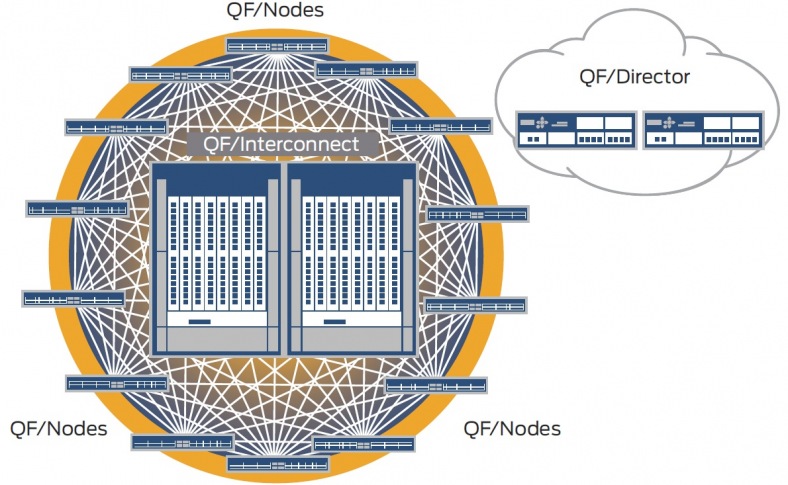
QFabric and FEX are both proprietary, but the effect of the proprietary is very different. With QFabric, you can build a huge network fabric, without worrying about spanning-tree, and have one control plane for a whole mesh of switches. With FEX, you can plug what looks like a switch into a Nexus 5000 or Nexus 7000, and that switch looks like a line card on the 5000/7000. FEX affects the next hop. QFabric can affect your entire data center.

FEX is pretty limited, and honestly I think it’s fairly inconsequential in terms of its proprietariness. You can use FEX, or just hang another Cisco switch off a 5K/7K, like a Nexus 3000 (with its merchant silicon) or even an Arista or Juniper box. Even if you use FEX, the effect is limited to one switch hop away. How concerned would a designer be about the effect of proprietary FEX? Pretty much it would have little effect.

The effect of QFabric, however, is potentially far more wide ranging.

That’s no moon, that’s a data center fabric

From the Packet Pushers episode (episode 51) on QFabric, Abner Germanow talks about 500 10 Gigabit Ethernet port where QFabric makes sense, which is a pretty large investment. If you figure roughly $2,000 a port, that would make it a $1,000,000 decision. If you order enough FEX/Nexus switches, you can spend that much, but you can go step by step and back out if you want.

With the proprietary versus open debate, it’s quite understandable that Juniper is very sensitive to the word “proprietary”. However, it’s tough to classify QFabric as anything but, as Ivan Pepelnjak says, “completely proprietary“.

Right now there are several open standards, such as TRILL, SPB, OpenFlow, VXLAN, FCoE, NVGRE and others looking to solve many of the same data center problems that QFabric looks to solve. And from the looks of it Juniper has been rather dismissive of some of the open fabric standard technologies, such as the much discussedWhy TRILL Won’t Work For The Data Center” argument (requires registration, fuck you TechTarget). Juniper is also taking a wait-and-see approach to VXLAN.

Even so, I don’t think Juniper should care if people call it proprietary. Yes, it’s proprietary. And yes, the effect of this proprietary-ness is huge compared to Cisco’s FEX because it affects more of the data center. But that’s a good thing.

Right now, because these open standards are mostly brand-spanking new, and no one is bat-shit crazy enough to build a multi-vendor fabric based on these new standards.

OK, maybe there is someone is crazy enough to build a multi-vendor Ethernet fabric

So QFabric has the advantage there, since even open standards are likely to be vendor-locked for now. And QFabric is a bit more mature than most of the new standards, in that it’s at least impelemtend and released. (Despite the terrible, and I mean just awful PR move bashing Juniper. Seriously, Cisco, that shit reeks sophomoric desperation. I feel cheep even linking it.)

What we do have to consider, however, is that in time the interoperability and maturity situation will be different, as it is for mature open standards today. It’s very common to have multi-vendor 802.1Q, OSPF, IS-IS, BGP, and spanning-tree deployments, without thinking twice about it. There will likely be a day when whatever new standards we’re dealing with now succeed and evolve to the point where we wouldn’t think twice about building say a TRILL fabric with multiple vendors like we do now with spanning-tree.

So QFabric is proprietary, and is not going to play well with others. That doesn’t discount it as a solution, but it is a serious consideration, more so than something like proprietary FEX. Proprietary has its advantages, and disadvantages, and the effect can be substantial or inconsequential, all factors to consider. I won’t even hazard a guess at this point as to how it’s going to play out, but like a good twitter battle, I’m going to enjoy watching.

Cisco ACE Gets IPv6 Support

Last month (with little fanfare) Cisco released 5(1.0) for the ACE 4710 appliance and ACE30 Service Modules, bringing IPv6 support for the first time.

Wait, what?

IPv6 was around when we were partying like it was… 1999

Yes, September of 2011, and Cisco’s load balancing platform finally gets IPv6. It’s a dual-stack implementation for free, and with an extra license fee, you can get the protocol translation (IPv6 VIP with an IPv4 server as the most common example) as well. Honestly, I’m not sure why Cisco decided to charge extra for the NAT64, since IPv6 is pretty much useless on load balancers without that ability. F5, A10, and several other load balancing vendors don’t charge for the IPv6/4 translation component. Also, the ACE10 and ACE20 service modules (the later which has a pretty large install base) will never have IPv6 support. (Cisco has an aggressive pricing plan for ACE10/20 to ACE30 upgrades).

So why are IPv6 load balancers worthless without 6/4 conversion? It’s very likely that web applications servers will be among the laggards in the transition from IPv4 to IPv6. You’ll pry IPv4 out of their cold, dead, unpatched hands. The 6/4 conversion allows you to setup an IPv6 VIP to communicate with the future Internet, while the servers run their familiar IPv4.

Honestly, I’m very underwhelmed by the Cisco ACE product line lately. They’re pretty far behind the competition (F5, A10, Citrix NetScaler, Radware) in terms of features, and Cisco doesn’t seem to be doing much about it. Don’t get me wrong, it’s fine for what it does. But other companies are innovating, and Cisco seems to be content with letting the ACE lineup stagnate, just like they did with the LocalDirector and the CSS. I’d like to see Cisco up their game with true content logic (like F5’s iRules). But considering Cisco discontinued their line of XML Gateways/Web Application Firewalls, it seems pretty unlikely they will.

Traffic control languages like iRules are double edged swords: They can solve a lot of problems, but they can also create a lot of problems when trying to solve problems. I’ve seen them save the day, and I’ve seen them consume an entire network department in a DevOps nightmare worthy of DevOps Borat. Still, I’d rather have it, than not.